I renamed files and now i can send it here. But still can not open in Seamly. míryterkapas.smis (1.6 kB) frontbodice.val (13.2 kB) základní střih prs+pre zasevek.val (16.9 kB)
The pattern opened opened fine for me. I think that it may be because they’re .val, so I’ve saved it as .sm2d. Please see if it will work for you now :
základní střih prs+pre zasevek.sm2d (16.9 KB)
And (perhaps) update your Seamly to the latest release.
(You may need to find the measurements file again.) 
Hello! I’m having just the same problem… It’s not the first time that has happened to me, is it anything I’m doing wrong? How could I fix it (and make sure it won’t happen again)? Thanks!!
Hello.
Now, I have same problem with a file. I saved it this morning and now it shows the error.
Hello @Sanny_Kreativ
If you post your pattern and any measurement file we can take a look and fix the pattern if neccessary or suggest what you need to do.
Thank you so much. Today, I have two other patterns with this problem. I did not change anything.
But as a new Member, i am not allowed to upload files. How can I send this in an other way.
I’m having the same issue as well, and can’t upload as a new user.
File Exception. Exception: element ‘draftBlock’ is not allowed for content model ‘(version,unit,image?,description?,notes?,gradation?,patternName?,PatternNumber?,company?,customer?,patternLabel?,measuements,variables?,draftBlock+)’
helo @Ash … I bumped your level up so you can post your pattern and any measurement file and we’ll take a look.
I bumped your level up so you can post your patterns and any measurement files.
Still the PopUp “Sorry, new users are not allowed to upload attachments.” :-/
Oops… my bad. I didn’t save the changes.  Try again.
Oversize_Pulli_neu.sm2d (66,0 KB)
Normal_32.vst (3,8 KB)
I can’t upload still either
Reload the Page. Then you`ll see a notification on the upper right, which informs about a new level. Then try again.
Please find the file attached. I just started using it the other day, so I don’t know a lot about the system.
Skirt.sm2d (13.2 KB)
Sorry… I didn’t click to save your changes either. But you should be able to upload now.
Yours is the easy fix… not sure why this happens, but this part at the end of the file needs to be near the top.
</draftBlock>
<!--Pattern created with Seamly2D v2025.8.18.212 (https://seamly.io).-->
<version>0.7.2</version>
<unit>cm</unit>
<description/>
<notes/>
<measurements/>
<variables/>
?xml version="1.0" encoding="UTF-8"?>
pattern>
    !--Pattern created with Seamly2D v2025.8.18.212 (https://seamly.io).-->
    version>0.7.2</version>
    unit>cm</unit>
    description/>
    notes/>
    measurements/>
    variables/>
    draftBlock name="Draft block 1">
Skirt_fixed.sm2d (13.2 KB)
Ok. Your pattern had a few places where the lineWeight was written as “1.00”, where as the schema call for “1”.
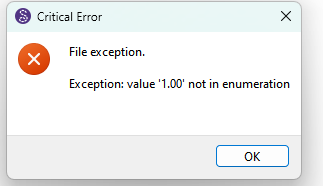
Clearly a bug I need to fix.
Here’s your fixed pattern.
Oversize_Pulli_neu_fixed.sm2d (66.0 KB)
Thank you so much. Is there an opinion, to fix it by myself for the next time?
Sure. The pattern files are just xml files that you can edit in any text editor. Just search for any occurance of lineWeight=“1.00” and replace with lineWeight=“1”.
In the meantime I have a way I can update the app to fix problem.