Buen día Grace. Muchas gracias, si señora, ahí los envío. 
Toga para juez.sm2d (18,3 KB)
Tablamedidas MUJER SENA.smms (4,2 KB)
Buen día Grace. Muchas gracias, si señora, ahí los envío.
Toga para juez.sm2d (18,3 KB)
Tablamedidas MUJER SENA.smms (4,2 KB)
Do you have a second measurements file for the larger size-range?

Hello, @BibianaDiaz
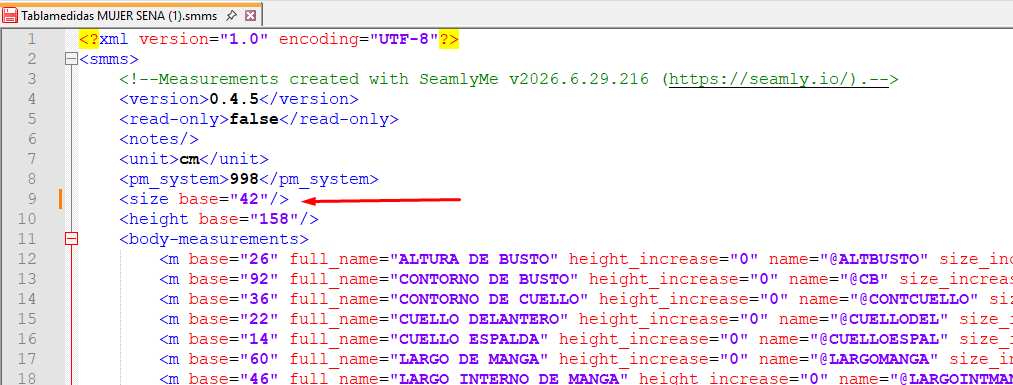
I see what is happening now. Those preferences don’t change the base size of the measurement file like I thought that it would. It’s only changing the visible size default and I don’t think that it’s working properly at the moment.
What you need to do is to open the new measurements file in a text editor and physically change the base size.
If you have a problem with doing this, you can send the new file to me and I will change it for you.
Once you’ve adjusted your measurements file, this doesn’t mean that the pattern will adjust smoothly as expected. You may still need to make adjustements to your formulas to adjust for both measurements tables, since some areas will increment the same while others will have larger or smaller increments between the 2 measurement charts and these need to have provision made for them.
This is one of the reasons that I’ve been longing for the ability to create a single measurements chart that will take a wide range of measurements - with various increment values - so that I can check my work as I create my designs without having to switch measurement charts.
That’s probably the biggest change in the updates to the multisize that I’m working on… where the increments (grade rules) can be different between sizes across the size range… along with negative increments.
Cordial saludo Grace: Muchísimas gracias, lo intentaré y te informo.
Cordial saludo Douglas: Muchas gracias porque siempre estás atento para ayudarnos. Dios permite que puedas hacer ese cambio para la siguiente actualización y por favor me avises, que pena. Porque veo que han salido muchas cosas mejoradas y no me entero. Jajajajajaj