I just noticed yesterday (since I normally use Light mode) that in the Linux build (first noticed in AppImage) the Point Name Toolbar default character dropdown is Black on Charcoal in Dark & Twilight modes.

I just noticed yesterday (since I normally use Light mode) that in the Linux build (first noticed in AppImage) the Point Name Toolbar default character dropdown is Black on Charcoal in Dark & Twilight modes.
I assume you mean this box? It’s the same on Windows.
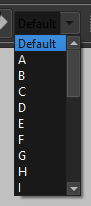
I fully expected the darkmode needing tweaks. 
Since this combobox is created programatically and not in Creator, and it is editable - it probably needs to have the pen color as defined in the palette implicitly set.
But then I’m confused by the QFontComboBox which is working fine without having to set any other properties in the code. 

I’m guessing the QFontComboBox is setting the editable and pen color properties internally. Need to take a look at the QFontComboBox source and see what it’s doing inside.
Well I figured out the issue is. Since an editable QComboBox uses the QLineEdit for the text, the QLineEdit’s text palette needs to be manually set.
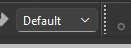
But as usual nothing is ever easy. It works as long as you don’t reset the Theme. If the theme is reset the text color reverts back to black until you restart the app. That means we have to reset the PointName combobox when ever the theme is changed.
Got it.


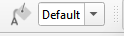
Turns out a simple 1 line stylesheet did the trick:
// Force any child line edit to dynamically pull from the current app palette
basePointComboBox->setStyleSheet("QComboBox QLineEdit { color: palette(text); background: palette(base); }");