From my experience with working with multisizes, they are just numbers until you apply importance to them, in this case, sizes. All the magic happens once you enter your base size and enter an increment.
When I asked for this feature… long, long ago… I was told that by adding extra numbers would mean adding more numbers to the Pattern Preferences and already, there wasn’t enough space for them:
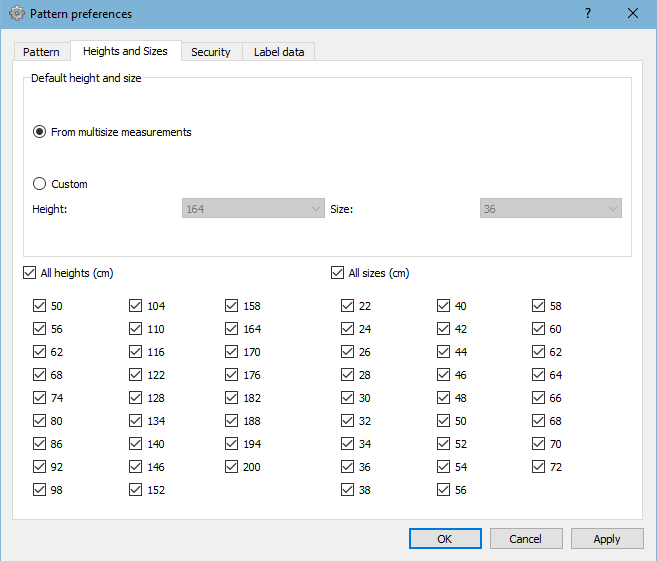
This is meant to constrain a pattern to certain sizes. Which doesn’t appear properly, anyway. In this case, I have selected sizes 34 to 44 but sizes 62 & 68 are also selected !?! Although, these 2 don’t get listed in the pattern where you change the size (also in SeamlyME):
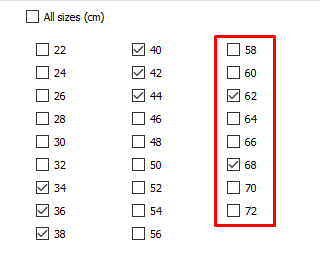
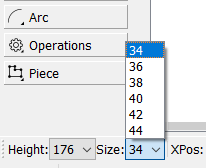
And, as far as I can see, there’s plenty of space for more sizes and check boxes. The list in the pattern will also get longer if you don’t constrain the pattern to certain sizes.
I think the formula that calculated the is universal based on your base size that you enter when create your new measurement file and the size that is selected at the bottom of the screen and the increments entered. So… (((selected size - base size) / 2) * increment) + base size (  in my best arithmetic style).
How will this help?
It will assist people making doll and children’s clothes. We will also be able to use USA & UK size numbers - at the moment, the sizes are chosen according to the EU sizing system which was also used in UK & South Africa and is based on inches. So this current sizing system is based on Imperial measurements while most of the world has moved on to Metric.
But, as previously mentioned, the numbers can mean anything. I’ve used them to make box patterns that resize. The magic all happens in the base & increments.
I’m not asking for more height sizes, because the magic there lies in the Russian Military standards and I don’t have time to figure out how many fractions things change according to height when a certain size is selected, so I don’t use it.
And in your case, you’ll need an extra Weight increment 