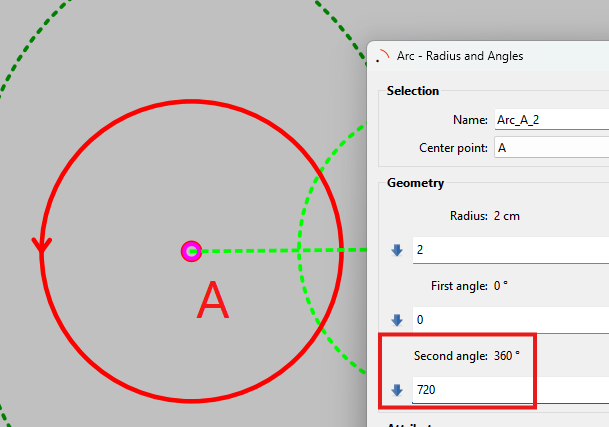
I am using the windows version of seamly2d. I have attached a screenshot of the “about” screen. Two of the tools under the ARC category are really difficult to use. The reason is that the on screen help prompt in the lower left corner flashes momentarily on the screen then vanishes. The prompt shows properly for all other sub-functions. The ones that misbehave are the first (radius and angles) and last (eliptical).

2 tykkäystä
Yes I’m aware of the issue. Somebody else reported it here on the forums. I can’t remember if I fixed it or just looked into it.  I will have to look back through the topics and see what I said .
3 tykkäystä
If you do not fix the issue immediately, would it be possible to tell me the first and subsequent prompts for the eliptical tool. this would allow me to enter the appropriate inputs in the correct order and use the tool. Today was the first time I had occasion to need it which is how I found the issue
1 tykkäys
“Tool::Arc - Elliptical: Select point of center of elliptical arc”
That’s it. Once you select the center the dialog opens.
BTW Now that I read that I can tell it’s legacy text. It’s just wrong.  It should read:
"Tool::Arc - Elliptical: Select center point for elliptical arc
Besides “point of center” being totally wrong… You can’t select a center of an arc that doesn’t exist yet.. thus “center point for elliptical arc” is a more correct wording.
Ahhh it’s come back to me… I thought Ihad fixed the issue with the arc and ellipse when I fixed the Normalize Angle routine. Because the default values were throwing an error the dialog could not be validated… and becasue the dialog could not be validat8ed the tooltip was getting erased. I should note that a tool’s dialog class gets created in the background, depending on the dialog, and what steps need to be taken (as noted by the tooltips), it’s not visible until those selections are made and / or Enter pressed. So in the case of the Arc tools the default values of the radii, 1st angle, 2nd, and rotation are being validated as the dialog class is being created… and they fail almost immediately. Like I said I thought I fixed it in regards to default angles… but there’s stil the radii. 
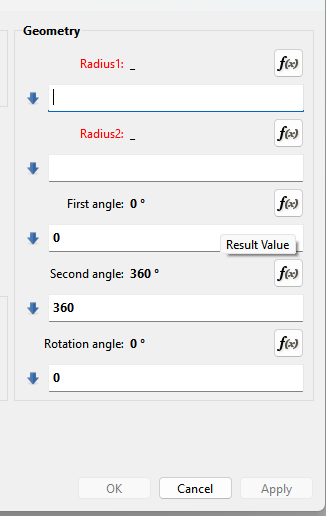
Since they are empty they are invalid and the OK and Apply buttons are greyed out.
Solution should be as simple as giving the radii a default value… like 0 or better yet 1. Valdation error goes away, toolstips remain visible.
Or we could get messy and muck around with the math paser and dialog so it internally it treats an empty formula string as 0 when it evalutes a formula. Nah.
3 tykkäystä
It wasn’t exactly as I thought - actually just the opposite… but it was related to the formula Eval() routine. When I added the default values months ago to the Arc and Ellipse dialogs… since there NOW are default values in the formulas the Eval() evaluates the formula and does a CheckState() to see if to disable the OK and Apply buttons if there is an error. If the formula is empty Eval() just returns with the dialog still disabled. The issue was due to an unwanted emit tooltip(“”) in an else block in Eval().
In other words I was looking in the right place, but for the wrong reason.
Anyhow… I have it fixed on my end. Will clean up a few items and test bit more and make a PR ASAP. 
5 tykkäystä
PR in the pipeline. I would think it will make it into next weeks release.
3 tykkäystä
thank you. I am trying to make a pattern for a (Victorian) bum roll and I figured out a work around. I will use two concentric circles with different diameters as the base for my crescent that I need tomorrow. I will have to use some actual ink to turn this in to a usable pattern but it will still save me time over hand drafting the whole thing. While you are in there, do you know why the object created when I try to draw an ellipse has no name and the field for the name is greyed out? Anyway, thank you for getting the fix into the pipeline
2 tykkäystä
Actually, I just figured out that it was working (except for the flashing tool tip which you are fixing). The other issue (user error) is that I was starting from a blank pattern piece with only point A and zoomed in so far that I was unable to see the ellipse that was created. I figured this out because it worked the same way when I added a circle. I have added 359 degree circles on many projects and not thought about the fact that I am unable to enter the name field. Is that a “bug” or a “feature”. I have been able to select 359 degree arcs in the past and expect I will be able to select the ellipse as well. I have never been able to assign a name and that has caused no problems. I am commenting only because I am curious
2 tykkäystä
For some reason that also appears to be fixed. I didn’t intentionally fix it.


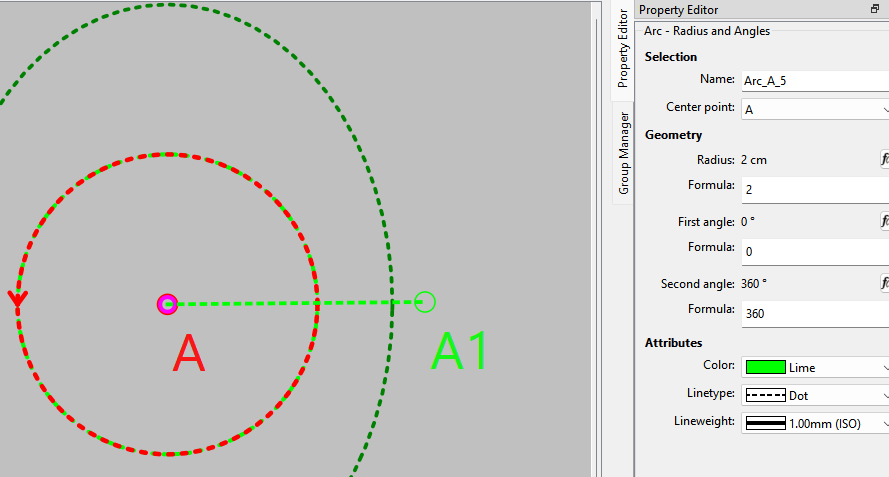
Why it’s greyed out is simple… you can’t edit arc names as they are created on the fly from the tool prefix + center point selected + the tool id number.
If you look at the file you will see - unlike points which have a name, arcs do not:
<point id="1" mx="0.132292" my="0.264583" name="A" showPointName="true" type="single" x="0.79375" y="1.05833"/>
<arc angle1="0" angle2="360" center="1" color="lime" id="2" lineWeight="1" penStyle="dotLine" radius="2" type="simple"/>
<elArc angle1="0" angle2="360" center="1" color="green" id="3" lineWeight="1" penStyle="dotLine" radius1="3" radius2="4" rotationAngle="0" type="simple"/>
If you switch the center point the name changes.

2 tykkäystä