We’ve all been there… you create a new tool Point - Length & Angle, and then you want to edit the formula and you get this:
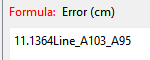
Yes you can click the Clear button, yes you can double click the formula text then click your variabke to over write the formula… but it’s annoying.
So @evans suggested clearing the formula if you hold the CTRL key while clicking the formula field. Well it proved difficult to be abe to override the key & mouse events for the formula widget… So I simplfied it.
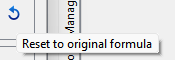
If the formula contains just a simple number (int or double)… the formula is cleared. Now you only need click your variable(s) to construct the formula. If you want to keep the number you can simply click the Reset button:
If the formula contains anything more than a simple number, the formula is not cleared. Note: A formula like 10 ± 2 will evaluate as a simple number and clear. 10 * 2 or 10 / 2 will not clear.
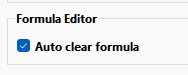
Also provided is a Behavior preference as to whether you want the formula to autoclear or not. The default being no, which will not change the current behavior.