Automating grainlines: length and position from the piece

Hello everyone!

I wanted to improve how grainlines work in Seamly, but then couldn’t decide on the best approach, maybe you’ll have thoughts and ideas.

Usually I want the same thing on every piece: run the grainline along the grain, nearly the full length of the piece, a little short of the edges, and in most cases centered on the piece. Longer pieces get longer grainlines, shorter ones shorter, and it should keep working when the piece changes or is graded.

Today there are two ways to do this:

  • Top + bottom anchors: create two points inside the piece, a little in from the edges along the grain, add them on the piece’s Anchors page, and pick them as Top and Bottom. Length and angle come from those points.
  • Center + length: create a point in the middle of the piece, add it as an anchor, pick it as Center, set the rotation (e.g. 90), and write a length formula, e.g. 0.8*Line_A1_A2 from some line along the piece.

Either way it’s extra construction points (and often lines) for every piece. When the piece changes shape they don’t follow it unless I build them from the right points, and on slanted edges (sleeve caps, for example) the arrow tip easily ends up on the cut line.

I’d like help with the user experience. These are the options I considered:

1. New variables for piece size

Something like CurrentPieceHeight / CurrentPieceWidth, used in the length formula as 0.8*CurrentPieceHeight. It fits the formula system, but height/width are bounding-box sizes. They only match the grainline when it’s at exactly 0° or 90°, and on angled or shaped pieces the arrow would still overshoot or fall short.

2. Predefined anchor points

Every piece automatically gets anchors like “Piece center”. That covers centering, but “Piece top” / “Piece bottom” don’t work because the grainline isn’t always at 90°. It could still be handy for other things, like labels, without creating points by hand.

3. Options on the grainline tab (the one I prefer)

  • Next to Length, “Match to piece”: the length is measured along the grainline’s own direction across the piece, either as a % of that length or as the full length minus a margin from each edge (e.g. 1 cm). The margin is measured to the nearest edge, so slanted edges are handled too.
  • Below the Center anchor, “Match to piece center”: the grainline goes through the middle of the piece. Unticked, it stays on the line you drew and only its length is fitted.

The angle still comes from an existing line or a standard value like 90/180, which is a single entry.

Would this work or anyone has other ideas?

Hello, @seam

I see that people drafting for the bespoke market are using an edge line for the grainlines now days. Personally, I like to put the grainline near the centre of the pattern piece and constrain it to below 30cm (depending on the size of the pattern piece). Since I normally edit my pattern pieces in Inkscape, I can do what I like in there, so as long as I have an idea of the direction of the grainline, I’m happy.

With regard to the bounding box of the pattern piece, If the piece is skew in the draft, this can leave quite large areas within the bounding box but outside of the pattern, so I don’t think this will work.

If I understand you correctly… The “Match to Piece” will determine the actual distance to the stitch line (not the cut line or the bounding box margin) with an optional offset. That sounds good.

I think this could work, but you’ll need to show me :blush:

Things to keep in mind:

  • Don’t break existing patterns.
  • Any new additions are likely to require a new schema.

Could just extend the grainline from the center to the SA… Like I did with the internal paths. I always drew a line the full length of a pattern piece as it faciliates lining the pattern piece up on plaids and striped fabrics. In fact I think this is a “wish list” grainline item… if not on Github it’s been mentioned on the forums.

Also you have to keep in mind that an Anchor point is special node type and IS a point somewhere on the draft block. You can’t just create a node point - you have to construct the point somewhere in the draft block.

Just thinking off the cuff… what if we have a checkbox attribute for Point tools that designates it as an Anchor point…so you don’t have to then use the Anchor Point tool? Of course it has to obey the dependencies rules where you can’t uncheck a point that is in use as a Anchor point.

Where do you think ‘CurrentPieceHeight/CurrentPieceWidth’ is located below?

Exactly… the center of the piece - which is the default location of a grainline that is not anchored. Rarely do I ever locate a grainline at the center.

Yes… this feature is handy for those pieces that can be placed on or across grain.

Because it allows you to easily align it to plaids and stripes. Probably more a mens suit thing. I always would draw a vertical line on piece edge to edge. In fact if I was manually grading a piece a vertical and horizonal pencil line is needed so they are there anyways.

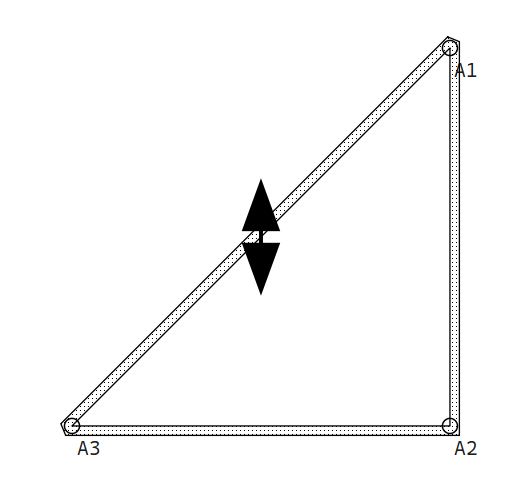
As shown above with my triangle piece.

No… For one you can’t create node points in Piece mode and you want to go right to the SA edge (for the same reason we extend internal paths for darts) … or it defeats the purpose