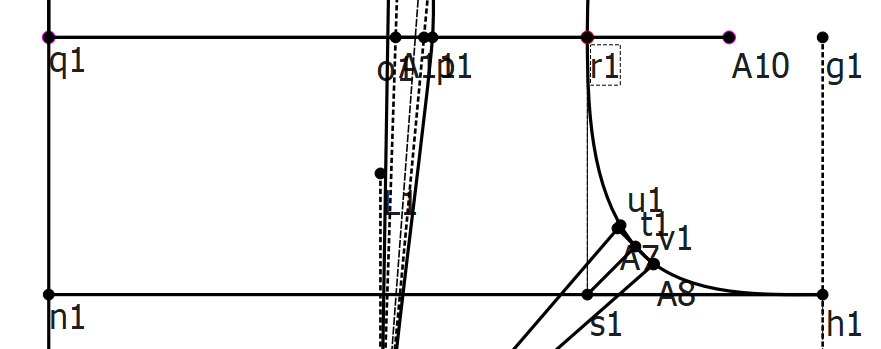
I have drafted an armhole, but I need to make sure the distance between r1 and s1 is at least 2″ (see attached picture), regardless of whose measurements I upload. Right now, I check this manually and then:
If the distance is less than 2″, I lower h1 by up to 0.5″.
If that’s still not enough, I raise the Line_q1_r1 line until the distance reaches 2″.
In manual drafting, this is easy to adjust, but in Seamly2D:
r1 and s1 don’t exist when I first place h1, so I can’t check the distance ahead of time.
Seamly2D formulas don’t allow conditional “if…then” logic or loops.
Is there a way in Seamly2D to set this up so the draft automatically adjusts until the Line_q1_r1 distance is at least 2″? Or do I have to handle this by manually tweaking h1 and/or Line_q1_r1?
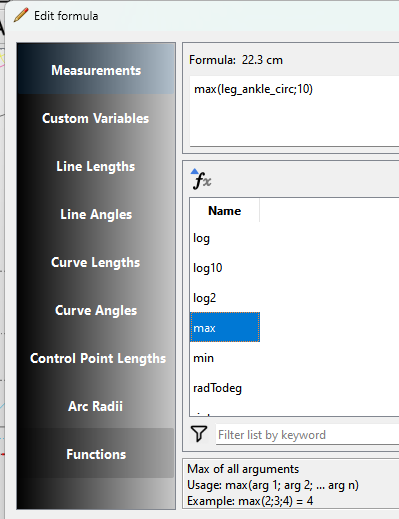
That being said there’s an easier way. If you never want the value to go below 2 use the max(arg1; arg2) function… where it will return the max value. If measurement is < 2, then 2 is the max.
Thank you so much! I was able to come up with the formula (Line_n’1_q1>2?0:((2-Line_n’1_q1)<0.5?(2-Line_n’1_q1):0.5)) for the amount I need to lower the h1 point, and it works!