Hello I`m new working with seamly. Its a fantastic program. thank u very much for your hard work on this. i have now a problem with a black screen in my working space. i don’t know how to fix this, because i can’t see any points from my pattern i’m working on. i’ve deinstalled the program, reinstalled it, made a new start with the computer, deleted all files from the program. nothing helps. does anybody have a solution for this problem?
2 Likes
Hello and welcome to the Seamly Forum, @Kathy83
This normally happens when you run Dark Mode on your operating system. There are a few solutions:
- Set your Seamly Application Preferences to give your workspace a lighter colour (File > Application Preferences > Graphics > Colors > Workspace):
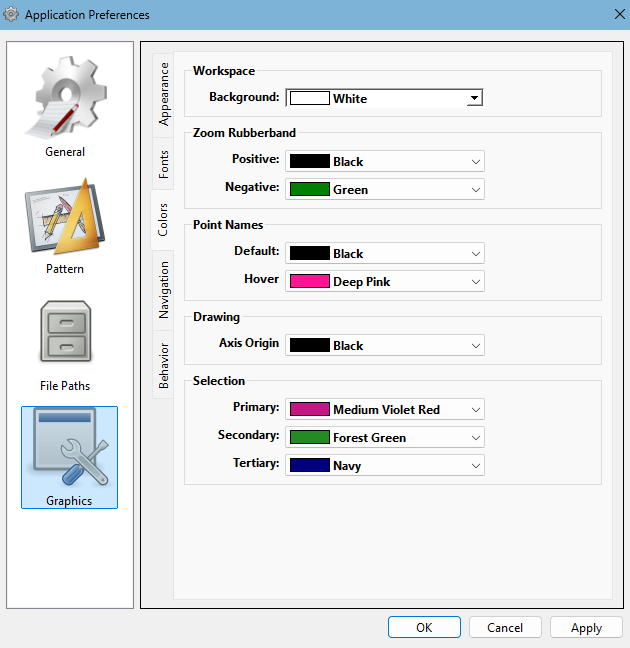
-
Change your OS to Light Mode again.
-
Download and install the latest version of Seamly which was released on Monday. Please take note that this version will not run on Windows 32-bit and you haven’t mentioned what operating system you are working with. I haven’t tested the dark mode because I prefer light mode and since this is a major upgrade, I can’t verify that it actually does support dark mode.
I hope that you can find a solution that suits you in the above. If not, please send us the version of Seamly that you’re working with and your operating system details, please, so that we can find a solution for you.
2 Likes
Thank you so much Grace. You’re a wizard.  It worked well. thank u so much. I had a notification, as i wanted to change a point name and then there was an error because of this. from that point, the color changed. i really don’t know why this happened. i’ve the latest version from seamly working on windows 11 64bit.
2 Likes
 I’m really happy that this worked for you. All thanks go to @Douglas who added the background color option.
2 Likes
Now that we’re building with Qt6 there might be an easier programming solution for us to make Seamly dark mode compatible.
3 Likes
Just an update on the “black” background. I don’t know if it’s Qt6 related, but the QSettings do not always return a default value as I had always assumed. There’s 2 parts to a setting… a key string , and a value. When you try to get a value from the settings you provide the key and a default value. If the key does not exist the key is written with the default value, and the default value is returned. BUT if the key exists with no value, getting the value either returns 0, an empty string “”, depending on the data type. So in cases where backgroundColor= exists, but no value… then getting the value returns “” and not the default “white” - where no color is the same as black.
Therefore… I made a fix to always return the default value. 
3 Likes