he tratado de importar las medidas de una muneca barbie y estan en archivo vit pero no encuentro el boton de importar ni se como hacerlo pueden ayudarme con ese tema
You don’t need to import it, just open the file with SeamlyME. It should open just fine. Then you can Save as .smim.
me podrias dar un paso a paso porque no se como poner el archivo .vit en seamly me
That’s assuming the vit was made in Tape with schema ver 0.3.3 or earlier.
Fortunately the Tape schema skips from 0.3.3 to 0.4.0, while the current ME is 0.3.4 so we can’t have a conflict with two different 0.3.4 schemas.
I wouldn’t mind a copy of that file myself. Post it here, & I’ll have a look & get it turned into a modern .smis for you & tell you how I did it for any future incidents. On the 26° probably.

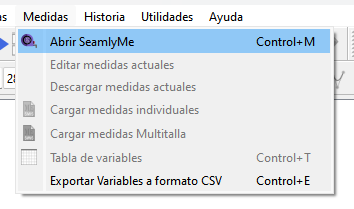
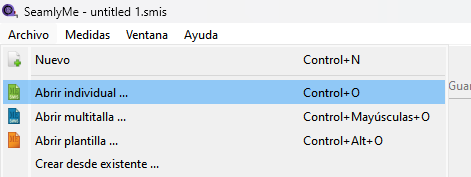
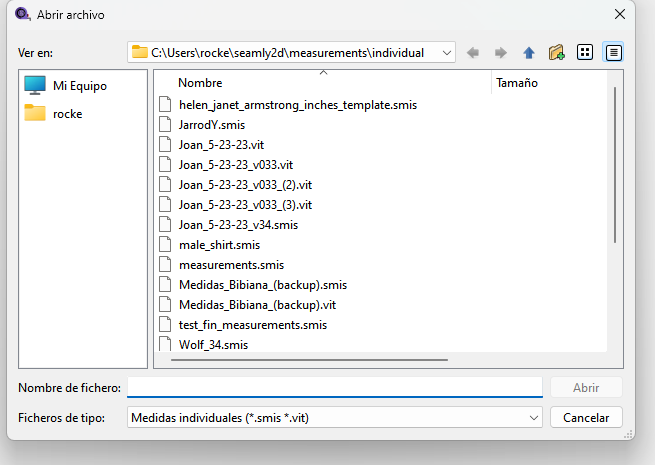
gracias voy a probar y les informo resultados es que hasta ahora estoy aprendiendo a usar el programa
me tiene ilucionada este program y quiero poder aprender a usarlo muy bien agradesco me den la oportunidad de seguir adelante gracias cuando aprenda bien a hablar ingles les escribo por ahora en español .
Not with newer schema 0.3.4 of ME individual files as it’s validating the root element tag for <xs:element name=“smis”>. 0.3.3 had <xs:element name=“vit”>.
Unfortunately (for now) the error message is rather cryptic if the schema doesn’t match.
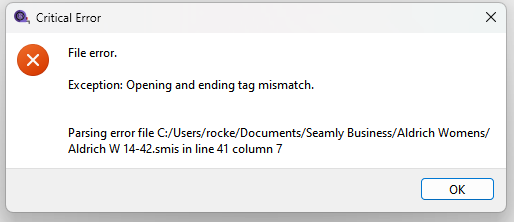
Would have to pre-process the XML to validate the root tag before Xerces to present a more coherent error message. That, or muck with the Xecrces lib. 
You’d probably get the same error message if you tried to open a Tape v0.3.4 if there was one… just a different line & col.
El español no supone ningún problema; podemos traducir los mensajes del foro si no están en inglés, y tú puedes traducir los mensajes en inglés (o en cualquier otro idioma) al español con la misma facilidad haciendo clic en este icono:

De esta manera, tú puedes escribir en español y nosotros podemos leer en inglés, o tú puedes leer en español cuando nosotros escribimos en inglés.