Hi @sjoerdg
Wow! You’re doing great  I’m battling the war of putting pleats into a blouse that will also serve as darts. For something that sounds so simple, my pea-brain is really battling
Hi @sjoerdg
Wow! You’re doing great I’m battling the war of putting pleats into a blouse that will also serve as darts. For something that sounds so simple, my pea-brain is really battling
Good evening Mr Soerj. When I want to use your pattern an error message appears, a copy of which appears. What should I do ? . Note that I use Valentina software. Yours truly. Erreur draw.docx (23,8 Ko)
If the pattern was saved in Seamly2D with a version greater than 0.6.3, it will no longer work in Valentina (and vice versa). I suggest try using Seamly2D.
Bonjours Thanks a lot
I followed your valuable advice to the letter. But Seamly does not have access to my “Desktop” then “Taking measurements” where the ZPattern file is located. What should I do. Thank you for your understanding. Please find attached a screenshot. Thank you for your understanding. Seamly echec.docx (119,1 Ko)
Try clicking on My Computer and then Desktop on the left section of the screenshot that you sent.
Still nothing really sorry. Seamly echec 2.docx (111,9 Ko)
You have to setup the file paths in the Application Preferences->Paths. I’d attach a screencap, but I dont have internet access with my laptop at the moment.
Bonjours, J’ai suivi vos précieux conseils et comme par magie ça fonctionne. Merci beaucoup Hello, I followed your valuable advice and like magic it works. Thank you so much
Thank you for this explanation to the first one who asked about this curve issue- this actually is my first quick study into this very specific and necessary quest concerning “understanding” the way the curve will behave. i have to admit that this DOES make a little more or a little less than half-way sense… not letting this comment sink in TOO far down i ALSO state here that the plan is too FULLY “UNDERSTAND” this debatable and questionable worthwhile AND time-consuming mathematical algorithm about how to precisely and correctly and artistically but first of all, ARTISTICALLY, and then, (“approximate” mathematical symbol) correctly, manipulate a curved line using point a through point a6- but with that said it is a worthwhile endeavor i continue to engage in, FREE, and this blog is so super zuper COOL, and well, THANK you.(i WAS simply looking for how to use a “FRENCH CURVE”- i will look for this next, this is MORE than good enough for now, but i am making my own clothing company from scratch no prior knowledge no skill just my heart just my soul just my spirit my mind no money and a thank you.)- thanks Douglas.
The French Curve is just a ruler that helps you to draw curves when working by hand. Professional pattern makers learn (with experience) to draft these curves by hand - without the need for extra rulers.
When drawing curves, one needs to bare in mind that if the start and end angles are not at a 90° or 180° angle to a seam, it will result in a peak or valley once the pattern pieces are sewn together. With this in mind, always check where you are drafting the curve and use the connecting edge as the formula for the curve handle, adding or subtracting the 90/180° as needed.
The length of the curve handle depends on the length of the area that the curve needs to travel before changing direction to form the curve. Normally, 2 sides lines are drafted before one drafts the curve, so I use the 2 side lines divided by 2 for the respective lengths of the curve handles.
I hope this sheds some light (theory) on the matter.
I do suggest that you download and install tomorrow’s weekly update It has an amazing change to simplify drafting curves, which you may read about in this topic: Auto-Smooth & Force Length (Code available, looking for dev help)
I’m wishing you all the best with your clothing company venture.
Hi Douglas, Thanks for these Bézier explanations. The curve-associated fog in my brain is slowly dissipating. A question though. On the two curves, I’m wondering why the formula for the C2 length is set as being derived from Line_A1_A2 rather than Line_A2_A3. Thx for all you do.
Hello and welcome to the forum, @Berbertie
Quickly looking through this topic, I couldn’t find exactly where the formula is but I’ll try to reply to you as best I can…
The angle is normally based on whatever attaches to that curve, so if it’s a line that the curve is extending and curving from, then the angle will be based on that line. If it’s a curve that is being extended by another curve, then the angle will be based as opposite or 90° from the curve handle angle that it is attached to.
With the curve lengths, this is based on the distance that the curve needs to travel and curve over. Since a curve has 2 curve handles, this will be halved, quartered or divided by 3 of another line that covers the same distance in a linear way. Each curve handle will travel a different direction, so a different line travelling the same distance area as the curve handle will be used and the 1/2, 1/3 or 1/4 will apply depending on whether the curve is a sharp curve (between lines that at 90° from each other) or less sharp. The sharper the angle, the longer the curve handle.
If you base these distances on any line in a pattern that will resize when the measurements are changed, to equal the distances that are travelled by the curve, you may use it. However, it’s best to use the lines directly where the curve is, just to be sure.
Hello Grace,
I’ve seen how much of your time you devote to helping others on this forum. You’re so kind. Thank you!
So, If I’m drafting a waist curve for a skirt, is it accurate to say I should (or perhaps, must) first draft the waist as a straight line from center front to the side seam so that I can then draft the curved waistline basing the control points’ lengths and angles on the length and angles of that straight line where it intersects with the CF and Side Seam respectively?
Hello, @Berbertie
Thank you for the kind words.
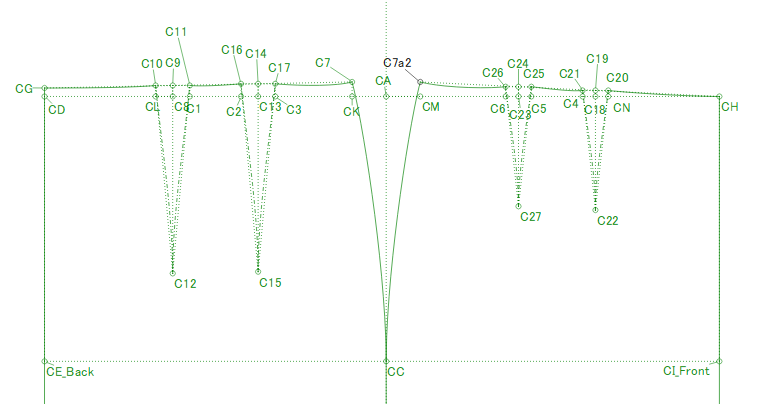
Normally, the side seams are slightly raised from the center line to allow for the extra distance that the side seam needs to travel over the hips, so I normally put a line from the lower center to the higher side. Then I place the center points for the waist darts and place the line to the dart point straight down. On either side of the the dart center line, I place points at 90° to the dart center line at the distance of half of the dart width and place lines from the dart point to these points. The number of darts will be either 1 dart or 2 darts, depending on the design.
I then draw the hip side curve, which I draw in a mirror curve for the other hip line since the front and back need to be sewn together.
From the side seam, I use the distance between the side seam and the 1st dart leg divided by 3 or 4 for the length formula for the curve and the angle of the top side seam curve angle plus or minus 90° for the 1st curve handle and the angle of the dart leg line plus or minus 90° for the 2nd curve handle.
If there are 2 darts, I use the dart legs for the angles as above and the distance between the dart legs divided by 3 or 4 (depending on what looks the best).
The last section will have a curve from the dart leg to the center made in the same way. The angle of the curve handle at the center line will be either 0° or 180°, so that can just be typed in, since it won’t change.
Using this method, if you rotate the darts closed, you will have a neat and smooth curve at the waist and the side seams will fit the body really nicely.