Hello Seamly Community,
I recently purchased the Aldrich Women’s Multi-Size measurement and pattern files (specifically Aldrich-Womens-MultiSize-06-14.smms and Aldrich-Womens-6th-Ed-Basic-Blocks.sm2d) and I’m having trouble with the sizing.
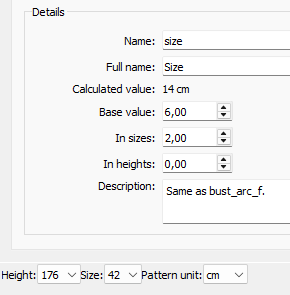
When I open the measurement file in SeamlyME or load it in Seamly2D, the size options in the base size dropdown show numeric sizes like 22–72 or 36, 38, 40, etc., rather than the expected US dress sizes 6, 8, 10, 12, 14 that the filename suggests.
The pattern file references the measurement file correctly, but it appears the measurements are using numeric size standards (probably bust circumference in cm) instead of the US sizing scale I was expecting.
Can someone please clarify:
- Why the Aldrich multi-size file uses these numeric sizes instead of 6–14?
- Is there a way to convert or switch to standard US sizes within Seamly2D or SeamlyME?
- Am I missing a different measurement file that uses 6–14 as sizes?
- How do others typically handle this when working with Aldrich blocks in Seamly2D?
I want to make sure I’m using the files correctly and understanding the sizing system. Any advice or guidance would be greatly appreciated!
Thank you so much for your help.
Best, Margo