grace—
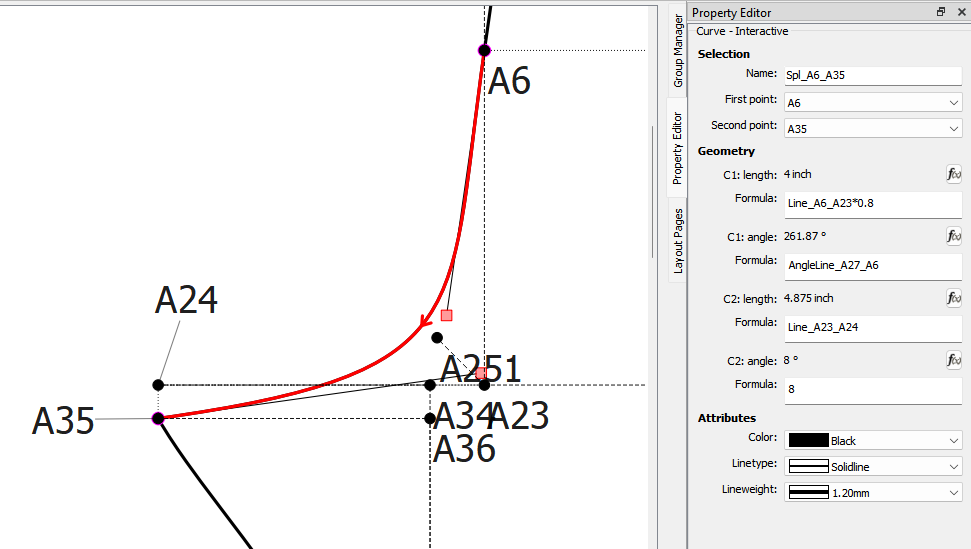
it seems like all the curves in the file cause an error. does it mean i should redraw all the curves?
here’s my most recent file. emily pants.sm2d (27.2 KB)
grace—
it seems like all the curves in the file cause an error. does it mean i should redraw all the curves?
here’s my most recent file. emily pants.sm2d (27.2 KB)
I’m not getting any more errors.
Save your file, close Seamly & perhaps switch off your computer for a minute (to clear the memory). Then switch on again & go back into the file & see if you’re still getting the error.
I am still learning but is the problem anything to do with the extra BKminus B&C Pieces.
It shouldn’t be. Those are in later draft blocks and are only her checks to see that the seams match.
Thank you Grace, I have learnt something new I didn’t know you could do checks like that.
LOL, yes. That’s how we ‘walk the seams’. I normally hide mine inside the pattern. @emilyli has put hers on different drawing boards.
The warnings are being thrown as the Property editor tries to build the first and second point drop down boxes. No error here on my end running the current release Windows build downloaded from Github:
The question is, can you repeat that same error - with the original file?
I have no issues with any of the curves. I’m a bit baffled at the momment ??
ok. i just went back into the file. when i click on curves no error until i go to ‘piece’ and then come back to the draft mode then the error happens when i click on any curve.
Aha. Now we are getting somewhere… I got a report of a similar issue… but only after changes were made to a patten piece, then going back to draft mode.
And Bingo… I just repeated the error.
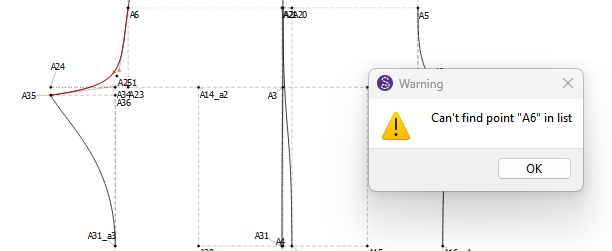
For now, what I found avoids the issue is if after making changes in Piece mode, and going back to Draft mode, is to undo, then redo. I’m not sure if this is resetting the increment count, or if it’s forcing a reparse of the pattern? Obviously to fix this is my priority.
thanks. if i close the file and reopen it then it’s fine. but the undo redo is a much better temporary fix.
i just tried the undo/redo option and it doesn’t work for me. still get the error.
Ok, what I’ve done is…
I’ve moved the checks to the main pattern on the knee line and deleted the other draft boards (mostly because they were a pain).
I deleted the pattern pieces and redrafted them.
I don’t know if it’s my imagination or what, but it doesn’t seem to be giving me those errors now.
Here’s the new file back so that you can check:
emily pants c.sm2d (20.7 KB)
Please let me know.
The other option for now is to disregard the Property editor and use the Tool dialogs… which don’t use the history to generate the combobox items. BTW… you can probably confirm we’re dealing with the same issue. If you go to Piece mode, change something like just moving a piece, go back to Draft mode… then open the HIstory - it will probably crash.
seems like there are no errors for now. thank you so much!
also makes so much more sense to have the checks in the same draft!
You’re very welcome.
Something else to keep in mind when mapping out a pattern piece is to always select the point before and after a curve. This seems to anchor the curve between the points. I noticed that you don’t always do this. I tried just adding in the missed points but I still got errors, so I went a bit drastic.
I hope & pray that it keeps working now. 
Just a note… I have figured out what the problem is… just need to figure out exactly where the problem is so I can fix it. Until then you can work around the problem by switching draft blocks and back to one you want. The issue only appears when there is more than 1 draft block, which is why it took awhile to figure out what was going on as I was only ever testing with 1 block and I never got the warning errors.
 So by removing those draft blocks that where checks & actually a huge irritation is actually what stopped the errors popping up.
Thank you very much, @Douglas , for tracking it down.
Yes. I’m pretty sure of that. Not sure why Susan could not reproduce the error right away earlier… might have to do with the fact it only happens when you load a pattern (with more than 1 block) and haven’t added any blocks… or maybe not starting the app fresh.