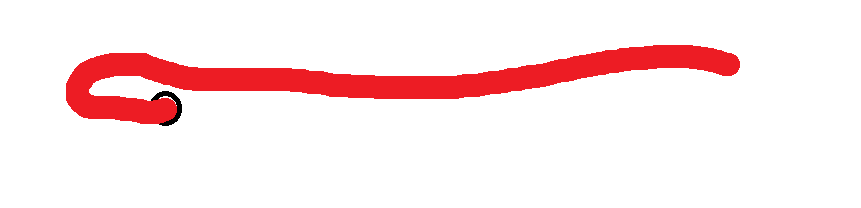
Hoy desarrollé a partir de los básicos de blusa y de falda, la interpretación de un vestido y todo fue excelente, cuando lo envío a maquetación con medidas multitallas, el delantero centro sale con el centímetro de costura que siempre le agrego (1 cm) y limpio, así:
I won’t know for certain unless I see you pattern file, but it looks like a curve handle that isn’t at the correct angle. It could be that the length of the curve handle is zero but the angle is at 300° - if this is the case then the out lines of the pattern will appear correct but the seam allowance follows the direction of the curve so it’s trying to find it’s way.
If you send me your pattern and measurement files, I can have a look for you.
Yes… I believe is a common issue where you can´t see which direction a handle is going if the length is 0. Where an angle could be flipped around 180 and the curve draws sort of ok, but a SA messes up because the routines are looking for interection points in the wrong direction as it tries to project corner points.
Where a curve with a 0 length handle could be doing this:
I agree with you. I don’t see any reason why it would do this with your personal measurements if it’s working correctly with the multisize measurements.
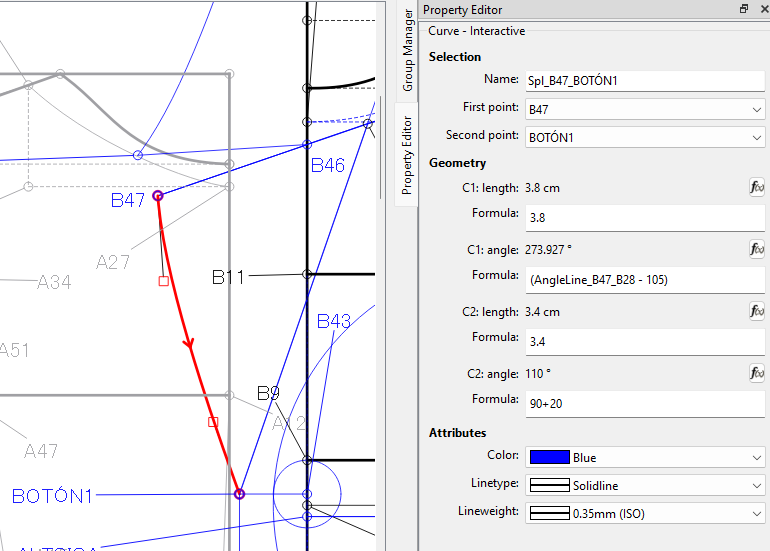
I’ve changed the curve angle at point A47 and set the length at a good number without decimals and it still doesn’t want to work:
It’s another one of those anomalies that I don’t fully understand… yet.
For some reason the seam allowance at point B46 is causing an issue… or maybe the issue lies in turning the corner at B47 coming out of the curve? That curve is reversed so it could be the source. As a work around I simply changed the default seam allowance to 1.001cm and it works.
Because changing the measurements changes the geometry, and can affect whether an intersection point is found or not. Adding that 0.001 to the SA was enough to make the SA between B47 and B46 connect correctly. This may be related to a fuzzymath issue where maybe a routine is checking for equality with too narrow a range? Think of it as playing golf… maybe we need to make the hole bigger so those near misses are now in the hole.
What I need to do (someday) is take a pattern that has an issue… and run the app in the debugger so I can look at what the routines are doing to calculate the SA. That way I can compare what numbers I expect to see with what the app is actually producing… otherwise I’m just specualting what’s really happening.
Cordial saludo Douglas: Muchísimas gracias, hice en el molde lo que indicas, en el sentido de dejar 1.001 de costura en el punto B42 y como dices funcionó. No entiendo la lógica pero después cuando tú, como anotas, profundices más en ese tipo de errores, nos lo harás entender.
Hice lo mismo en el punto B42 de la pretina, por si acaso al ensamblar la prenda surge alguna diferencia.
Cada que tú o Grace me ayudan de esa manera tan fantástica, aprendo más y más, por ejemplo hoy en el tema de la curva invertida B47-BOTÓN1 que tienes toda la razón en decirme que está invertida, porque además hoy en otro patrón me pasó lo mismo, una curva invertida me causó problemas en el márgen de costura. Necesitaba en esa curva dejar en cero el márgen de costura y lo tomaba despúes de la curva y no antes y analizando me di cuenta que era por haber hecho la curva invertida (que entiendo es hacerla en el sentido contrario a como giran las manecillas del reloj).
De nuevo muchísimas gracias Douglas. Infinitas bendiciones.
The .001 is a 1000th of a cm which you can’t even measure. Like said it’s just a work around for an edge case like this that’s falling through the cracks.
Yeah.. until I really look into the SA routines (which I did not write) I don’t completely understand either… other than it’s probably a floating point math issue. When we use decimal or “real” numbers there can be rounding errors so you can’t directly compare is A = B, or is A = 0 as rounding errors could cause A to be .999 and B to be 1.001 where they are close, but not equal. That’s where we can use fuzzy math and say If the difference between A and B is less than .002 then they are considered equal. In my golf analogy the .002 would be the size of the hole. If we make the hole bigger… say .004 then we can have more error where using an SA of 1cm would work.