I see that you are still missing 1 update. The pattern shows that you’re on 0.7.2 while my pattern is showing 0.7.3, so if you go to Menu > About Seamly2D and click the Check for Updates button, you should be able to download and install the latest from Monday (I don’t know if anything changed between the 2, but it’s best to keep up to date).
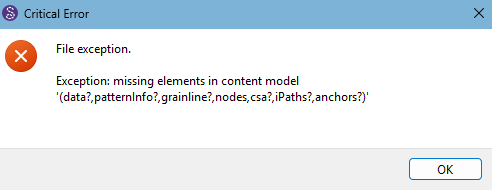
However, this doesn’t fix the problem, which seems to be in the pattern pieces:
Here’s the file with just the bad piece (PatroonDeel_1) removed, I’m still going to spend a little time seeing if I can fix it:
Basispatroon_Slip_naam_Rev2.sm2d (24.1 KB)
I’m pretty sure that the items in the modeling section marked inUse="false" were the pertinent ones, so it probably wasn’t wanted anyway. The Union section may be related, but hewing that out left the pattern unusable. I don’t think the few kb weight savings are worth chasing this any further.
I had a measurements file which was compatible. So I know it works, but could use refinement on the formulae. But, yeah, it’s not often that people stick to the “known” measurements.
If a modleing tool / node is marked inuse=“false” the garbage collector will remove the tool / node the next time the pattern is opened.
I deleted that tool (and it’s point nodes) and it opens… upto where it wants the ME file. Again the Union tool is marked as inUse=“true”, but there is no united piece.