Hi - new to Seamly - I’ve had two files corrupt on me - I get an error message “ Exception: Missing elements in content model ‘(data?,patterninfo?,grainline?nodes,csa?,ipaths?,anchors?)’. This happened after Seamly just shut down and I tried to go back into the file.
Welcome @ionaerodger
If you want to post your pattern(s) and any associated measurement files, I can take a look and fix most if not all of the files.
Also if you’re haven’t already, I suggest updating to the most recent release version.
Hi - many thanks - much appreciated however I’m getting a message saying that new users can’t upload files?
I think I’m on the most recent version as I only downloaded for the first time a few weeks ago
I bumped your user level… you should be able to make attachments.
Thats really helpful but I’m afraid I’m still getting the msg that new users can’t load files?
I’ve checked twice and your user level is 1, so you should be able to attach files. Try closing and reloading the forums page.
I was caught by the same thinking. I downloaded for the first time only a few days before the latest release, which was on 2026-2-16 
I believe the shoot for weekly releases.
Unless there’s an issue in the CI - like signing issues - the applications build automatically every mon at 1:30 am UTC time… whether any new additions or updates have been made or not. Depending on your locale it could be late sunday night… like me.
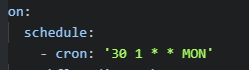
Pre-releases are built whenever a branch is merged or pushed to the main develop or test branch, and artifact builds are built whenever a PR is made or committed to:
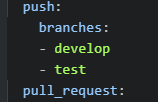
You can tell by the PR commits what has changed with the build:
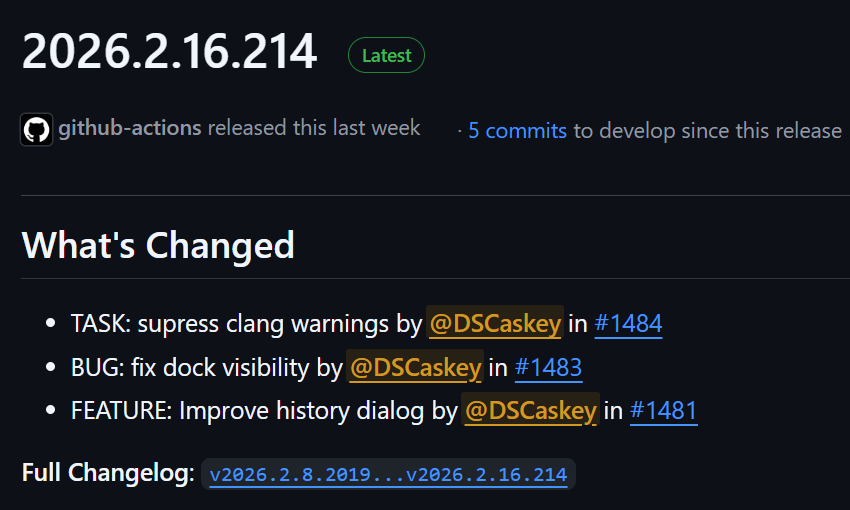
The changelog will show you the full diff of all the file changes in the code. Not much use to the avg user.
Also what happens in the CI workflow is the tests are built and run.If any test fails, the whole CI build will fail and no artifacts, pre-releases, or releases are deployed. This generally is only going to happen with a PR, as we’re not likely to approve a review and merge / rebase a PR if the tests fail. One could run all the tests locally before pushing a branch, but it’s time consuming, and 99.99% of the time if the tests fail it’s the translatons test.
Here’s the file in usable condition: KMR sleeve v1.Fix.sm2d (13.3 KB) I had to delete the piece tracing to get it to work, fixed a bit of wonkiness with the sleeve cap splines, & traced the piece off. I have no idea if my tracing even matches what you wanted though.

Thankyou so much - really appreciated!
From a bug point of view I’d like to get an idea how this happened. The pattern piece below is missing any nodes. A piece has to have at least 3 nodes or it’s not a piece.
        <piece color="#ffffff" fill="nobrush" forbidFlipping="false" hideMainPath="false" id="51" inLayout="true" locked="false" mx="0" my="0" name="PatternPiece" seamAllowance="true" united="false" version="2" width="1">
            <data annotation="" foldPosition="Undefined" fontSize="0" height="2" letter="" mx="304.016" my="441.388" onFold="false" orientation="Undefined" quantity="1" rotation="0" rotationWay="None" tilt="None" visible="true" width="3"/>
            <patternInfo fontSize="0" height="2" mx="-357.402" my="441.388" rotation="0" visible="true" width="3"/>
            <grainline arrowLength="1.27" arrows="0" length="2.667" mx="30" my="529.583" rotation="90" visible="true"/>
        </piece>
That’s why @Pneumarian had to delete the piece. Do you recall deleting the main path nodes or undoing something? You can’t delete all the nodes from a piece or it becomes invalid and you get this status message preventing you from saving the piece
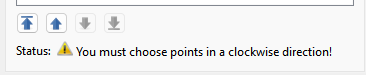
So I’m a bit confused how we have a piece with no nodes, and want to prevent this from happening. 
its a very simple sleeve block but has the nodes you’d expect? Things started to go wrong when I created a first piece that wasn’t right and then created a second - I wanted to delete the first on so was trying various things - I may have tried deleting nodes in an attempt to get rid of the first piece
It shouldn’t be possible to delete all the nodes, the Okay button deactivates if you try.
I don’t know if you’ve found it already, but the option to Delete the piece is at the bottom of the context-menu which has the Properties Editor option at the top.
@Douglas I wonder if it would be worth having a “Delete Piece” option appear with the “You need more points!” message.
Hmmm… I just discoreved a bug where you CAN delete all the nodes and the OK button stays active. If you keep pressing Del it will delete all the nodes without the warning message and disablng the OK button. I suspect this might be due to the fact the QTable is handling the Del key internally, while the Context menu-> Delete is handled by Seamly.
IMO what might make sense here is to pop up a message box “Do you want to delete the Pattern Piece?” Yes / No whenever the You need more points! warning message displays.
I like that idea better!
Is it possible that you used the Del key to delete all the nodes? I found that is a bug and am looking at fixing it.
Good news is I found the bug with using the Del key shortcut… I’m less sure about deleting a piece from within it’s dialog class. Deleting a piece would be deleting the tool that opened the dialog.
How is it that saying goes… “Remember: Pillage then burn.”
Sounds like a recipe for exciting glitches.