Hello dears, maybe you can help.
a half day work ist gone cause i cant open my file anymore. it is loading and loading and say that the program don’t react. I could cry. The autosave didnt work well so my latest save is hours ago. Is there any way I can fix that file?
The autosave will normally kick in if you have a crash of some sort & the softwre shuts down and closes. The next time you open the software, it will ask you if you would like to restore the pattern that you were working on when it shut down.
As a rule of thumb, I constantly hit the save button or CTRL/CMD S as I work and, when I’ve done so much that I’d hate to lose anything, I make a Save As and add a v1, v2, etc. to the file name. This way, if I get myself tied up in knots or do something to break the pattern, I can always go back to a previous version and, when I’m happy with my pattern, I can rename it and delete all the steps that I created while working.
With that said, let’s see if we can fix your file…
First force close Seamly. Then restart your computer and open Seamly again.
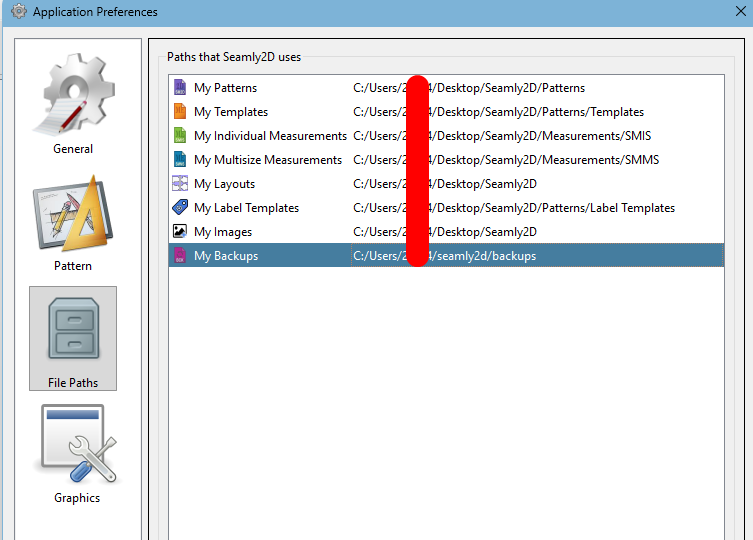
Go to File > Application Settings > Pattern Paths and check where your backups are going to:
Close Seamly and open your file explorer and navigate to the path where your backups are and find the latest backup there. Double click on it to open it in Seamly.
Or you can go to Open File and navigate to the Backup folder and open the most recent back there.
There should be at least 2 backups of your file in the Backup folder, so if the latest one doesn’t work, you can try the next one.
If neither of these work, please send us your pattern file and measurement file so that we can check what happened and repair it for you. It will also help for you to let us know what operating system you’re working on and what version of Seamly you have.
Not yet. I’m just pushing the branch with the backup feature now. Should be in next week’s release. There could be backup files there, but only if they were backups from converting an older pattern version. The new PR also includes fixing mangled files containing extraneous white whitespace from unwated line feeds.
The problem is probably with the measurement file, not the pattern file, and occurs when you have both open while you’re working and perhaps a 2nd pattern file that uses the same measurement file.
You’ll need to open the measurement file in a text editor and remove all of the blank lines between the lines of text. If you’re unsure of how to do this, please send the measurements file so that we can do it for you.
The PR just finished buiding… so once it is merged it shoud be in next next week’s release. So going forward every user should have at least 1 back of 2D and ME files everytime a pattem is loaded. If the conversion backup is enabled you will have 2 files for every 2D or ME file that’s converted and loaded. You will be able to save up to 10 combined backups of each file. Once the backups for a given file hits the limit set in the prefs, older copies will be removed. i.e. You can have a revolving history.
I’ve also thought about adding an option in the future to automatically or manually clear backups that are older than a set time. Or I might revisit some of the backup things I was going to implement that were on the crashed hardrive… such as having some builit in manager for backups. Like having a backup for the backups, where you could move backup files off to an external drive.
Yes sometimes one wants to create a backup specifically before doing something. It may be handy to have a Backup & Restore on the File menu. At the moment, the backup is just another copy of the file that you need to navigate to, to open it. Up to you.
thank you for your advice. since i tried the same mesurement file on another pattern i think that is not the problem. I let the file load overnight and now it was open. i made two saves immediately. But i have the same problem with the copied files and now the file that was open are lacking again. Maybe it is too big? It is a huge pattern cause it involve some sleeve variations. and since i still try out i have a looooot of points and lines that turned out to be in hindsight as useless.
and the lack starts mostly when i open the pattern pieces to correct some points. could that be
just for info: before the important update, when I had problems with empty lines in measurement file, they got very big and there were problems with loading them.
so @Katharina_Gottschlig do you have the latest release of Seamly, I think that error is no more and the empty lines are now automatically deleted?
Not yet. I just merged the fix for removing the extra LF’s lsst night… so it will be in next week’s release. The current release at least fixes the problem of adding more LF’s to ME files., but it won’t fix the files themselves.
 I’ve been working on older files lately, so that’s what I saw.
 Up to you.