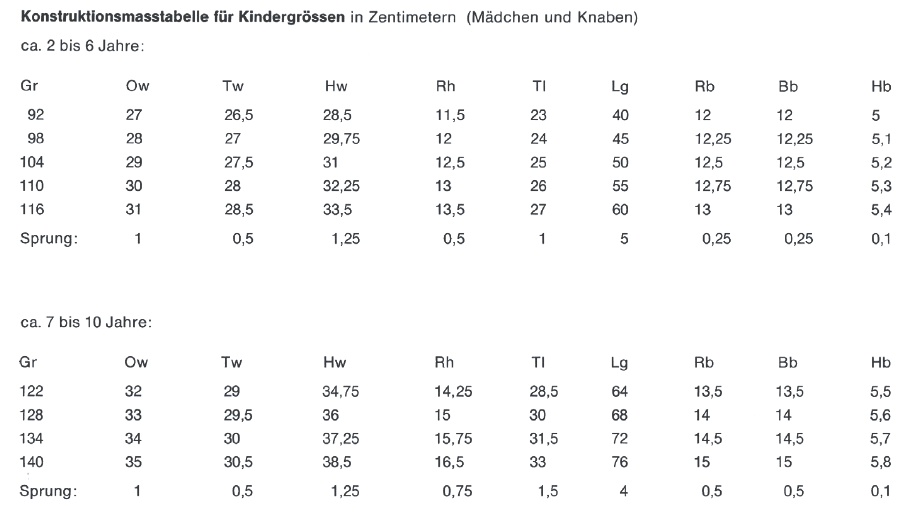
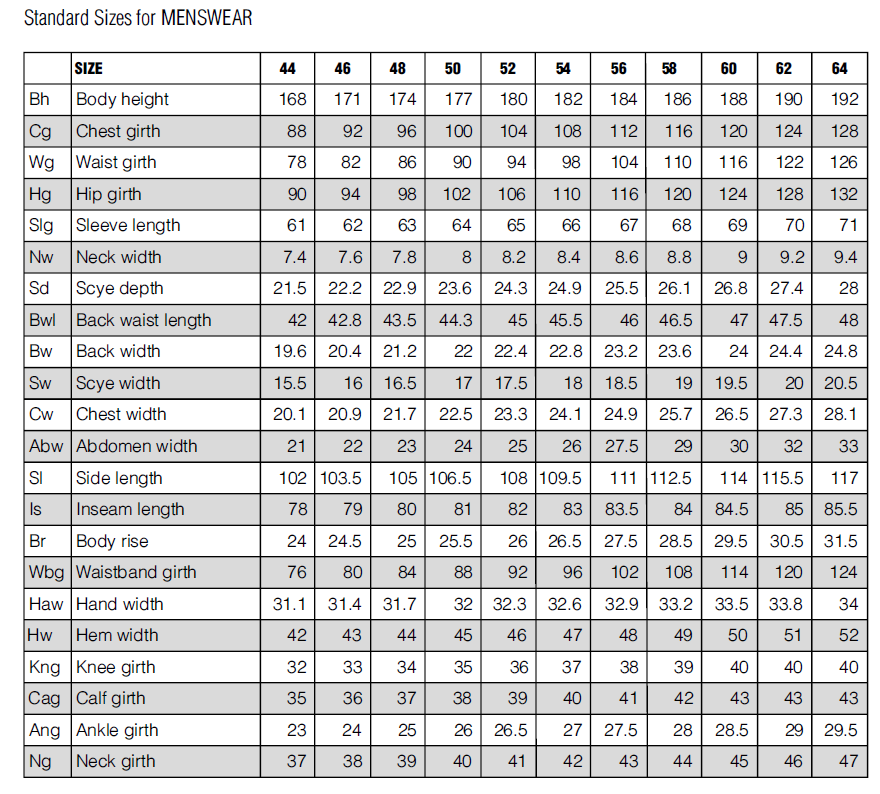
I will studie your suggestions, the changes and check all my multisize tables! Oh my, that’s a big error I made right there at the neckline. How embarrassing I’ll definitely check all my numbers!
Thanks for your feedback, I appreciate it a lot! Working on my files now …
I am trying to understand your explanation as to why size should be used instead of height. I think I understand your explanation of using height + size to achieve different changes; I just haven’t seen it used in the systems I use (Mueller und Sohn, Hofenbitzer and Rahl).
Just to wrapt it up, you are using “size” as a basic counter and “height” as additional? The tables you are using are defining the type of the body (and all the measures) according to the “girth” and the “height” of the person you measured?
To me, the difference is simply between children (height) and adults (size). The problem I have is with the different increments for different size ranges. Currently, I use different multisize files for different size ranges. This makes it prone to mistakes. Is there a way to apply your solution to solve this?
Firstly, let me tell you that I don’t use the system that I descriibed to you, that is the reason that the height increment is included in SeamlyME. I ONLY work with the size option and I advise everyone else to do the same because of the 6 count between the sizes. If I am making bespoke patterns/clothing, I use individual measurements taken from the person, even though I ALWAYS use a multisize measurement chart when I’m drafting so that I can check that the pattern will resize smoothly over a variety of sizes and later add the individual’s measurement chart.
Looking at your charts, I suggest that you use only the height option for the children and only the size option for the adults.
Thank you, I do the same, multisize for drafting and personal measures for sewing. Except with kids, where I mostly go with one size up from the table, so they can be used for longer times :)))
 I’ll definitely check all my numbers!