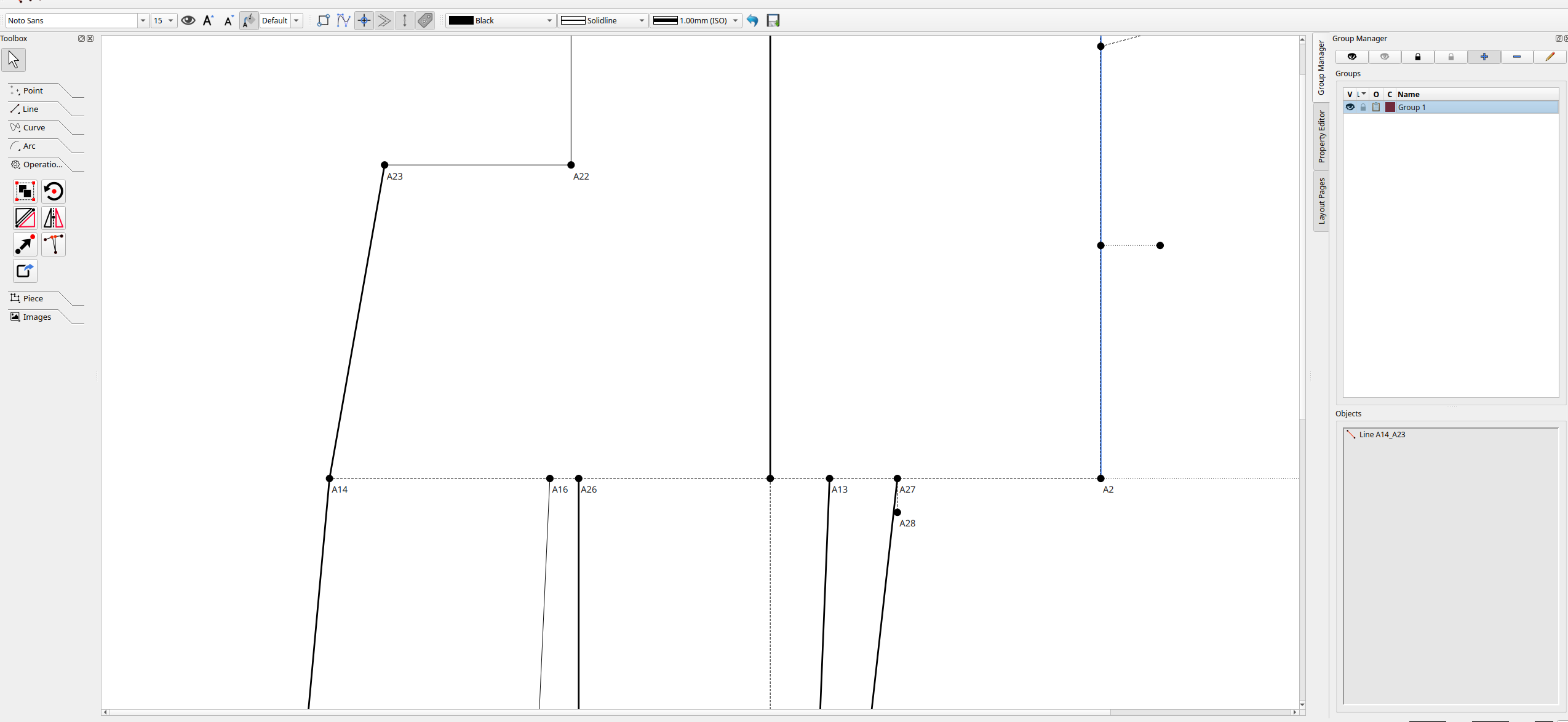
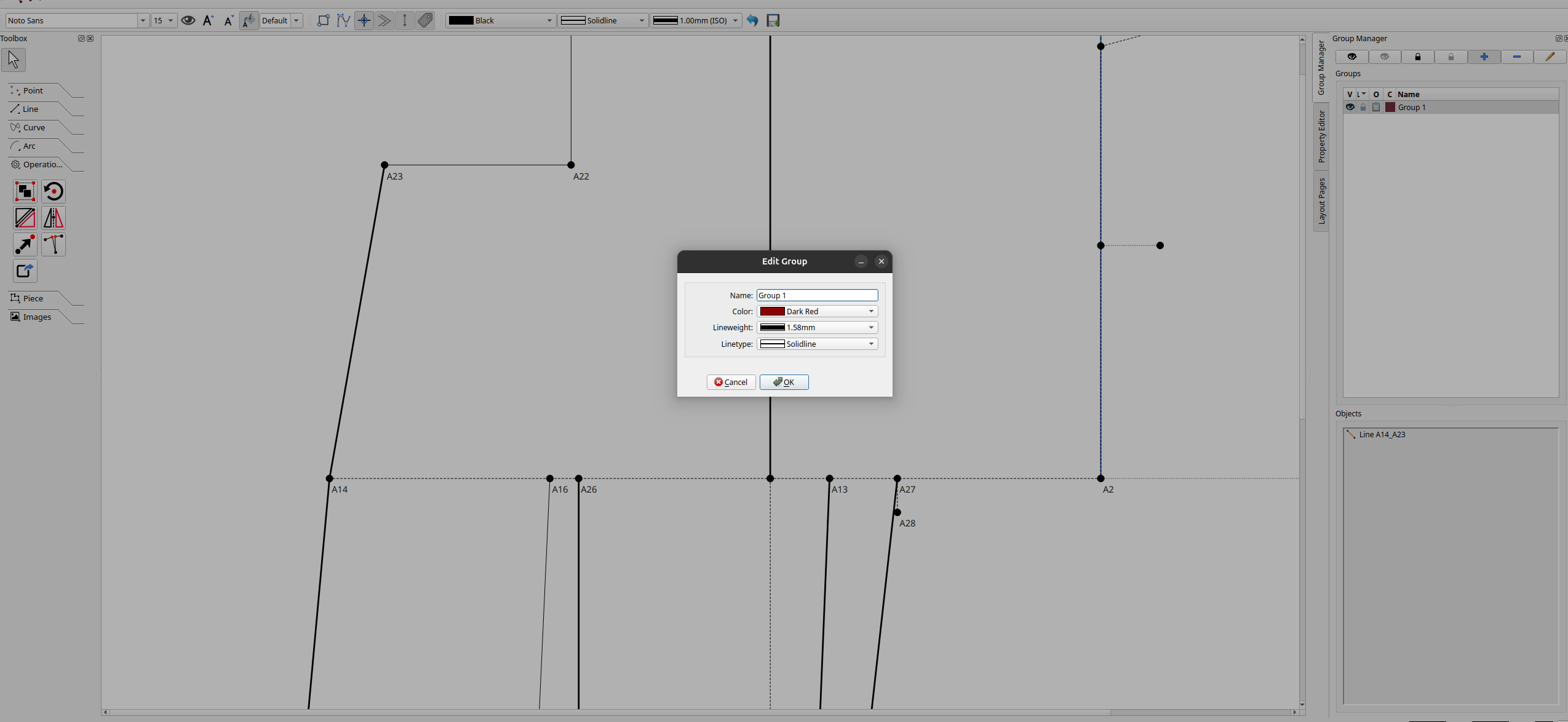
In my environment you can see that I have added a specific color to the group and line weight. The Line_A14_A23 is part of that group but the styling to it is not applied.
Not implemented yet. There is an issue I have to resolve yet in regards to having to maintain the current behavior of objects being able to be in more than 1 group (against my judgement)… like which group’s color to use?
Hm that is a good question. I think having any logic to decide automatically would make things very tricky and error prone to solve. Perhaps the safe way to go would be for objects to be allowed only in one group at a time. Or, actually, what would be more interesting would be that instead of overwriting the item display, the group styling is used when you want to highlight the group. So if I have a group selected in the group list, that group gets highligted in the view with the style I chose, but then when I deselect the group then the highlight goes away.
Alternativelly the group color could be used as a highlight on top of the item, so if I have an object in 2 groups, the object style is the style set for it, but then iff it is in a group, then the group style gets added as a thicker style underneath to create the highlight effect.
Not an option. To me it’s illogical to have an object in 2 groups, but the fact we can has become a feature that some users rely on.
That being said… I’ve pretty much worked out a solution but here’s what I need to do. My orginal 1 group called for this:
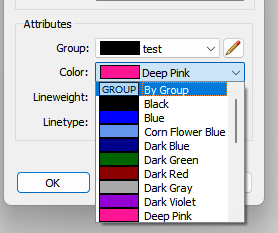
Where you could set the group for a tool, and whether to use the group color. But a dropdown will not work for being in multiple groups so that will need to be a table widget . In the table you would be able to check which group color to use. Of course a table widget will eat up more dialog real estate. 
I agree with your thought that an item should only be in one group. You mentioned that it’s a usecase to be in 2 so I assumed it is a requirement. What if instead of a table, you would have a view under the object so you could manage the belonging to a group by object.
Then instead of a table you could have a “list of groups” per object. And you can click add to group, select the group and color. Then you can add to group again, for the same object and so you can build up a list of groups in the object.
At the same time, you can then view the group itself, and in there you would see all the items in that group alone.
What it should be is nested parented groups… unfortunately the groups were an after thought and crammed on top of an existing data structure. Not my doing. IMO it would take too much effort to rewrite the app.
Because the idea is when you create a new tool, and the dialog pops up you can assign it to groups as you create it, not after the fact.
You already can:
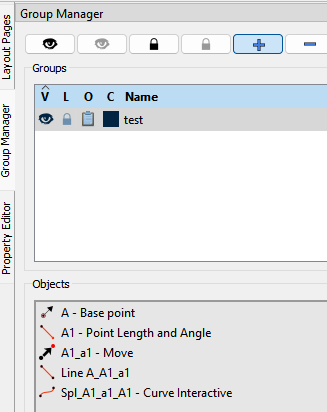
But that misses the point… you want to see ALL the groups a tool is in. By having a table list in the tool dialog you can manage which groups the tool is in and which one is the chosen group color.
 I’m afraid I’m the culprit for keeping the groups as they are because I love using the same point in many different pattern pieces and each pattern piece has its own group. Sorry about that.
I’ve also devised a linetype system where a solid line is the outline of the pattern, a dashed line is a valley fold and a dot-dash line is a mountain fold. All of these types are normally either piece outline or internal paths in the pattern piece. All other structural lines are fainter dotted lines.
I try to set the colour of the pen to the same colour of the group that those lines are going to go into, but I’m a bit off on this, I keep forgetting to change it.
As for finding dependants when you want to delete a point, I normally run through the History and try to remember where I may have used a point and pay special attention to lines between 2 points. If you put the point label into the search in the History, it will, at least, highlight the lines for you and @Douglas is very kindly looking into adding columns for the length & angle formulas to the History, so that these may also be searched in the future.
That is a necesity for sure, to have that however, I think the easy workaround would be to not use the same point, but make several points that have the same property as the first one. So having the ability to make an object copy, for a point or a line. That way you can have the original point change, and then all the child points would reference those values.
In this way, you would have one point in each group that will allow the styling to be applied, while also making it possible that each group has a different point copy and not have conflicts.
Though this makes this more complicated in the app to maintain … I think if the styling of the group is only shown temporarily when I select a group in the list, then it is enough. The points have their own base styling, a point can be into several groups and when I need to work with one group, all I want is to highlight the group in the moment to see what I am affecting with my changes. But once I deselect the group then the points revert to the default styling.
We already have that… It’s called the Move tool & you only need to put in 0 at the Angle, Distance & Rotation - only thing is, you can’t change their colours at the moment.
I normally try to draft with the minimum number of points and curves, but you have something going here that’s woken up a few brain cells. I’m going to test it in my current project.
I am reffering that the copy should also be done automatically when you want to add the point to several groups. Ultimatelly you wouldn’t need to manually copy the point and add it to group, it would be done automatically. And also probably there should be a dedicated “Copy” tool for convenience. People won’t think to use the tool to copy an item, and it is also counter intuitive. If I move an object I don’t expect it to make a duplicate regardless of what values I put in it.
If you put 0 in the values when you move it and it creates a duplicate then that sounds like a bug.
Yes… for my project, I’d like to edit the points that I copy into the new group without affecting the original. Can’t do that with the Move tool.
Yes… that’s what we need - to make the app overly complicated.
Just rewrite it in react.
I’m joking please do not
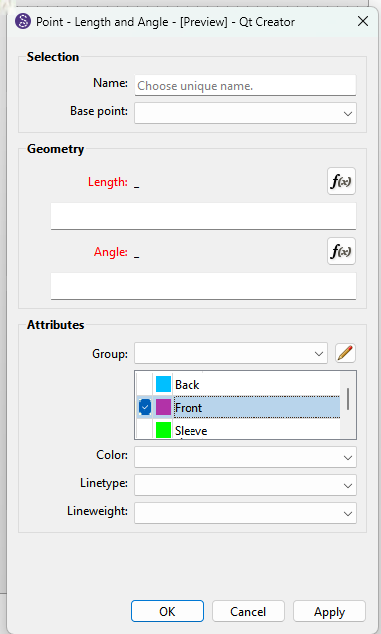
My thought was that then you can have one tool belong to only a single group at a time, but you can have the copies or siblings to have the same represented point or line “be in several groups”. In that way the siblings are proxies to the groups and the parent item separating the concern with a many to many type relation
In my opinion, the easy way is to have the colour set to the 1st group that the object appears in. Any subsequent objects will be the colour of the group that you’re adding them to.
Yes this would be the simplest and straight forward one
Technically that’s what I was doing. There’s 2 routines used… one that gets a list of groups an object is in, and another that gets groups the object is not in. Since in my orginal fork I made it so an object could only be in 1 group, getting the groups a object is in could only return a list with 1 group. So I only needed to take the 1st item in the list, as it was the only group. If I were to implement the code as it is, it would just take the 1st group in the list. This would probably work fine for users that put objects in only 1 group.
I like the bygroup idea, similar to AutoCAD ByLayer ByObject.
What if we push it into a full ByLayer/ByObject model (AutoCAD-style)? It resolves the multi-group ambiguity cleanly without needing the table widget.
Add: Default group
Every object lives in a base/default group on creation.
Add: Group level
Similar to layer, we add group level, upper means higher priority
Resolution order (per style property — color, weight, dash all resolve independently):
- ByObject if the property is explicitly overridden on the object
- Otherwise ByGroup, using the topmost visible group in the panel as tiebreaker when the object is in several
- Fallback to the default group’s style if nothing else resolves
The nice consequence: changing a group’s color live-updates every ByGroup member — no per-object table to maintain, and recoloring all construction lines becomes a one-edit operation.
For example, the groups could be:
- Bravo: A, B, C, E
- Alpha: A, C, D, E
- Base/Default: A, B, C, D, E, F, G
Styling for A will be Bravo, D will be Alpha, and F, G will be Default.
I’ve already done work on the group colors - that’s why “byGroup” is already in the schema… there is an issue though in the fact that due to legacy behavior objects can exist in more than one group… which leads the question “which group color” to use when an object is in more than 1 group?
I had previously worked out the ByGroup colors with presets on my fork after the split from Valetina, where I had removed the ability to place objects in multtple groups so the byGroup was not an issue. When I went to add the byGroup to Seamly it became an issue because users exploited what I consider a loophole, and have been making patterns with objects in multiple groups for years. Seamly rule #1 do no harm to existing patterns. So until I figure out a solution (and finish several other features) , the group colors is on hold.
Also Evans is working on a paint feature for the objects which is also on hold because I need to finish the work I was doing to refactor code to allow for setting the color for operational tool objects - which currently don’t have color - they are just black. 
So… once I get some room to breathe and finish some pressing issues, and Evans finishes the paint feature, and I can get back to adding the byGroup for the color attribute… we will be able to color objects and groups in any number of ways. 
Also something else we have discussed implementing is a Seamly semantic group color preset so that if that preset is selected a number of groups are created with a set of standard colors… or probably a whole pen style preset as the byGroups is aready in the schema for the lineType and lineWeight.