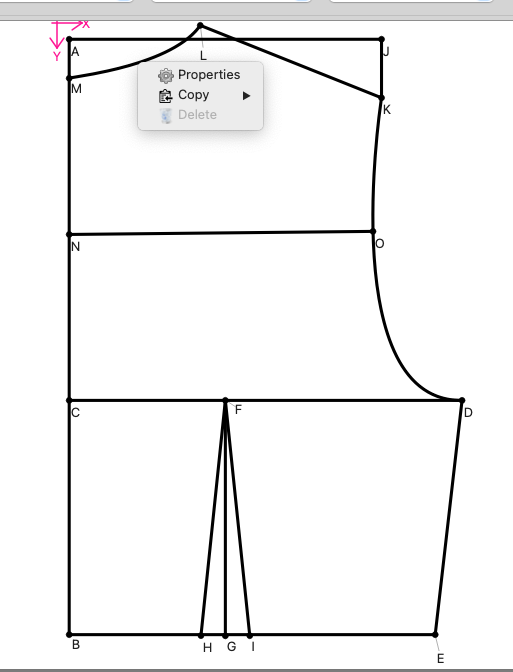
I changed the shoulder slope measurement in my Seamly2D pattern and it affected the neckline. Now I’m trying to delete the shoulder slope line/point and neckline curve/point, but I can’t.
I opened History, but I still can’t figure out what to delete. Right now, the only objects Seamly seems to let me delete are the side seam and the dart, and if I delete base point A, it deletes the whole pattern piece, which I don’t want.
Am I missing a step?
How do I remove just the shoulder slope and neckline without deleting the whole bodice?
If the point you are tyrying to delete has dependents, that is being referenced by another tool… you can’t delete it (Delete is greyed out). You have to work backwards deleting tools until you get to the one you want to delete. Think of it a tree branch… you can just cut the branch… you have to cut the end leaves, then the small branches, until you get to the branch you want to cut.
Note that this also applies to trying to delete ponts or curves used in pattern pieces… to delete a point or curve you need to delete any pattern piece it’s used in first.
Also you have to be careful of deleting points or curves used in formulas. While a tool may not directly reference a point (meaning you can delete it) , it may use the point in a formula, and deleting the point will break the pattern. You then either have the option of either undoing the delete, or fixing all formulas that reference the deleted point. It can be tricky to try and fix formulas where you may find it easier to jst create a new point / line / curve and instead of deleting it, just hide it in a junk Group. Its on our list of issues to figure out a smart way to automatically fix formulas.
As @Douglas said… First delete any pattern pieces that you may have already created that use these objects that you wish to delete, and then delete any lines from one point to another that you may have put in for the shoulder line.
However, can’t you just edit the shoulder line’s angle to adjust the shoulder slope? And if the neckline has the formula to the shoulder slope, then it will automatically update when the slope changes, so that you don’t need to delete anything. The pattern pieces will also adjust to the changes.