I have created a basic block in seamly 2d but can’t figure how to import the measurements into seamlyme. Do I have to create a measurement file first with blank measurements and then import. Or will it create its own sections.
2 Likes
3 Likes
Thank you, I wasn’t sure whether I needed to do that first. Sorry but I have brain fog from catching Covid while in hospital for a month.
2 Likes
Oh dear… I hope you feel better soon. 
2 Likes
I am still not 100% but slowly getting there. Roll on the summer. I am still having problems importing the pattern measurements into seamlyme, no idea what I am doing wrong. The Pattern is only a test its not important.
slopertest.smis (1.1 KB)
slopertest.sm2d (8.2 KB)
2 Likes
Hello, @Saphire and I hope you get better soon and enjoy the best of health for the rest of the year and more.
Looking at your pattern, you can load up a measurement file, but nothing will change because all of the measurements are entered into the formulas.
Looking at the measurement file, you’ll need to enter the measurements at each measurement area so that you can use them in your pattern. At the moment, they’re all zero.
Only when you’ve done this, then you’ll be able to edit the formulas in the pattern to refer to the measuerments in the measurement file.
1 Like
Sorry, Grace, I am still a bit confused. I thought that by putting the categories in seamlyme, it would automatically fill in the zero areas with all the measurements when I import the pattern. Have I got this totally wrong and I still have to create a measurement file first before creating the pattern.
2 Likes
Wow! I think I got it, seamlyme importing from pattern only creates the formulas and categories with zero ready for me to fill in.
2 Likes
Correct. Importing the measurements only creates the measurments the pattern needs, but does not fill in any value. If it could there would be no need for the measurement files.
3 Likes
Yes, it only imports the names of the areas used in the pattern. This way, you can quickly make a measurement file for a new person by just importing the areas & then adding their measurements.
It’s best to check your pattern, as well, because some of the formulas are exact values and won’t resize if you change the measurement file - the formulas need to be changed to SeamlyME measurement formulas.
2 Likes
Thank you, Douglas and Grace. I get it now, it’s taken a while for it to sink in. I tried for two days to import but was getting nowhere.
2 Likes
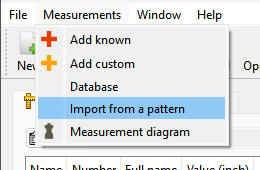
I was thinking maybe we should look at changing the menu text from “Import from a pattern” to something more descriptive? In a sense one is not really importing the measurements from the pattern, but rather creating an empty set of measurements based on what the pattern expects. I can see how one could be confused.
BTW… I think @Grace touched on this… We often have to deal with fixing a users pattern where they have sent an ME file with missing measurements or no ME file at all. We can’t open and test a pattern without the measurements. So I will use the Import menu which will either create a whole new ME file, or add the missing measurmenets to an existing one. I will then guesstimate a value for the missing measurements just so I can open the pattern.
3 Likes
Maybe “Use pattern as template”?
I think it’s also worth mentioning that only the measurements in “normal” locations are transferred. If you did something silly like use height_ankle for your label dimensions, or crotch_length as part of the calculation for a control point, but not in a regular measurement, it won’t be acquired.

3 Likes