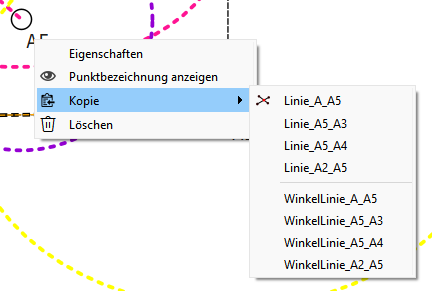
Hey folks… I just submitted a PR for some fixes and improvements to the copy function of the tool context menu.
Fixes missing tools in the context menu copy.
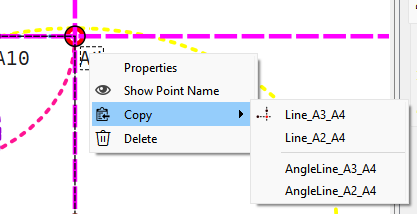
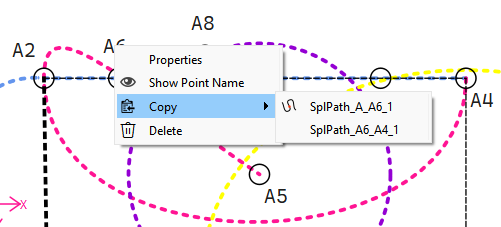
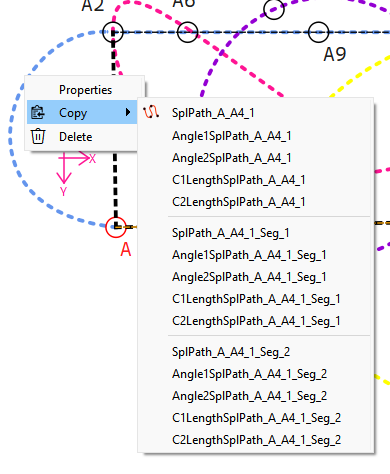
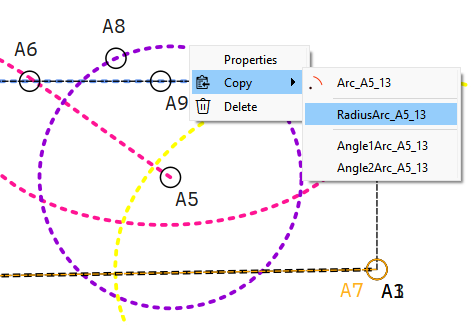
Refactors the method in which the tool varibles are displayed and copied. Instead of a Copy menu item with Submenus for Length or Angle, the Context menu now displaays a Copy menu item with Submenu items that are the variable names for those that the tool creates.
The submenu also displays the tool icon with the 1st item. Some examples:
Note: Operation tool objects are not included in the context menu copy as changes are needed at a lower level to make operation tool objects individually selectable - which is beyond the scope of this PR.
My pleasure. Once I crack the nut on refractoring the op tools source & destination objects we can improve this tool, as well as the Zoom to Object, and Evans can finish the paint tool he was working on. The problem is that the scene (workspace) interacts with the “tool id’s” and the op tools are child “object id’s”. We need to be able to select an individual op object and not the whole tool.
Yes, then the question is… Do you want to select the whole Operation object? Or do we only want to select an individual object within the Operation? How can the software know exactly what it is that we want?
Nope! I think it’s perfect the way it is now until we can solve that question
For the purposes I mentioned we want the individual object (id). Each operation object has it’s own id…
But the op tools emit the tool id when you select anyone object. We need it to emit just the slected object. For example… in the case of the copy tool… if you have an op tool with a point - length & angle and a spline… and you select one or the other without knowing the object id we don’t what list of variables to display that are associated with that object.