I’m running Ubuntu in a UTM Virtual Machine on new Apple M5. I do NOT want to run open source software on my primary machine. What version should I download?
Unfortunately, I can’t pretend that I know anything about Mac or Ubuntu or running a Virtual Machine. However, I’m sure @Douglas or @Pneumarian will be able to assist you better.
In the meantime, did you download from Github? The 2 on Github are identical, latest versions. The only difference is that the one needs to be installed in the usual Linux way and the Flatpack one (as I understand it) is flattened into an installer.
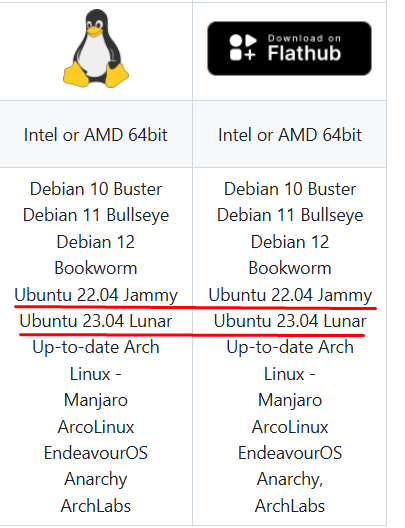
I’d suggest that you check that your Ubuntu is listed in the image above and try the other download to the one that you tried before. (The link to the Github is at the top of this page.)
I’m sure one of the others, that know more, will come by and help you later.
Long answer: The Ubuntu VM on an M5 is an arm64 based Ubuntu, but the AppImage is only x86_64 (64 bit Intel/AMD), thats why thats not working. On flathub we provide both arm64 and x86_64 based builds.
Hmmm… any idea on how the performance between the 2 would be? I would assume with the Flatpack one would gain the advanatge of sandboxing the app if that is a priority.
While that is indubitably your right, all “open source” means is that anyone has access to their own copy of the source code. Seamly’s development team verify any submitted changes to the code before allowing it into the official Seamly branch. As such, Seamly, as hosted on the official repository, is less likely to have dangerous code than most proprietary applications.
That said, I certainly understand being leery of any non-OEM (or even some OEM) software. Doubly so for a cyborg.
I meant is there a performance difference between running the MacOs app vs the Appimage / Flatpak? In other words… why run linux on the Mac if there is a Mac ver?
There surely is a small performance hit, running Seamly in an Ubuntu VM vs running it locally on macOS. But @Cyborg mentioned that they “do NOT want to run open source software on my primary machine” in the initial post. Why that is only @Cyborg can elaborate on further