Hello! I recently installed Seamly onto my Mac which subsequently konked out. I really want to install the program again but on a Windows computer (then when I’ve sourced one, a Windows laptop) Does Seamly allow me to install multiple times on different devices or do I need to make a new account with a different email each time? If it is possible, please could you direct me how to find a download link!
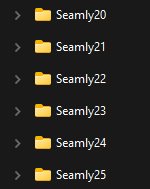
Yes. In fact you can install as many instances of Seamly as you want… you just have to rename the folder when you’re istalling on Windows. On the Mac it just creates another folder with the same name. Since I just got a Macbook I’m not sure how to rename folders.
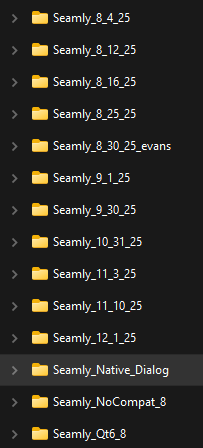
Since I may have the need to check out an older version a user be having an issue with or a new feature branch of another dev - I keep installation of Seamly and I name the folder by release date:
BTW. Since Seamly does not use the registry it’s agnostic as to where it’s stored. You can copy an install folder and run Seamly from any device… SD cards, USB sticks, external drives, or other computers.
Back in OS 7.5.3 single-clicking on the name instead of on the icon would allow you to rename it. OS 10.4 would let you do it by hitting return (notenter) after selecting the icon if I recall aright.
My current Linux install has the option in the context menu.
That works to rename the app file, but not the folder (volume / location). There is no Rename item in the context menu.
That being said… I believe the Mac release will always install the app in a folder named Seamly with no way to change it during installation like the Windows install. Now that I have a Mac I can go back and finish the improvements I was making to the “Check for Update”, and maybe change that.
 OS 7.5.3 single-clicking on the name instead of on the icon would allow you to rename it.
  OS 10.4 would let you do it by hitting return (not enter) after selecting the icon if I recall aright.
 install has the option in the context menu.