Dear developers,
Everytime I close Table of Variables Seamly2D crashes and closes. My operating System is MacOs Catalina and Seamly is 0.6.0.1.
Best, Aline
Dear developers,
Everytime I close Table of Variables Seamly2D crashes and closes. My operating System is MacOs Catalina and Seamly is 0.6.0.1.
Best, Aline
Which Build date? There are several iterations of 0.6.0.1. (Or maybe which Build Revision would help them more, I’m not sure. Both date & revision together wouldn’t make anyone mad!)

Process: Seamly2D [65944] Path: /Applications/Seamly2D.app/Contents/MacOS/Seamly2D Identifier: org.seamly2dproject.Seamly2D Version: 0.6.0 (0.6.0.1) Code Type: X86-64 (Native) Parent Process: ??? [1] Responsible: Seamly2D [65944] User ID: 501
Date/Time: 2020-10-06 17:41:06.484 -0300 OS Version: Mac OS X 10.15.6 (19G2021) Report Version: 12 Anonymous UUID: 1F0BDC4F-8074-69B8-BA61-F10CA019D3C7
Sleep/Wake UUID: 9A2BD63A-4973-4D01-A227-73F8DDD2655D
Time Awake Since Boot: 560000 seconds Time Since Wake: 5800 seconds
System Integrity Protection: enabled
Crashed Thread: 0 Dispatch queue: com.apple.main-thread
Exception Type: EXC_BAD_ACCESS (SIGSEGV) Exception Codes: EXC_I386_GPFLT Exception Note: EXC_CORPSE_NOTIFY
Termination Signal: Segmentation fault: 11 Termination Reason: Namespace SIGNAL, Code 0xb Terminating Process: exc handler [65944]
Application Specific Information: Calling windowShouldClose: on the delegate for the QNSPanel 0x7fe89d74eb50
Where can I see this information Pneumarian?
I usually look at About Seamly2D in the Help menu.
I believe Douglas is working it out to where we can copy/paste the information, but on the Sep28 (20200928) weekly release a screenshot of the about window was still the easiest way to get the info.
Aug, 3rd, 2020 Build version: Git:c403baf205f0
You don’t even want to know. I had stashed changes of several branches I was working on sort of disappear on a recent update of the develop branch?? … So I have to reconstruct from a backup. 
Thanks Aline for the report…
How are you closing the Table dialog? With the esc key? There was an issue with that that I just fixed in the last weekly update. Try the latest update and see if that fixes the problem. Either way if you could report back if the issue is solved for you on the Mac or not that would be helpful.
Hi Douglas. Sorry for my late response. It’s working perfectly now. I’m using weekly release 20201012 and it’s fixed. Thank you very much!
Best, Aline
Hola @Douglas , Gracias por toda la información que comparten en este foro. Es mi primera vez escribiendo en el  , soy un poco penosa para esto. La pregunta sería ¿Cómo sé que hay actualizaciones nuevas de Seamly2D? Me encanta esta herramienta para el patronaje. Saludos
Muchas Gracias. Ya lo descargo. 
Glad it’s working for you.
There are weekly (test) releases every Sunday/Monday which can be found on the Seamly Github page. You can use the link Aline provided… just click back to the main page and you should be able to find a link to latest release.
Muchas Gracias, estaré pendiente a esas actualizaciones. Saludos
Dear Douglas,
The problem occured again in the weekly version of Seamly2D (20201026) in MacOs Catalina. In Windows it works perfectly.
I open a pattern, then open variables table. When I close it with ESC key or using x icon in the upper left corner the program crashes and generate a crash report.
It is working properly in Ubuntu 20 as well.
The github issue is here: BUG: Variables Table Crash in MacOs Catalina · Issue #346 · FashionFreedom/Seamly2D · GitHub
Hi Aline… I saw the Github issue, and will attempt a different fix. Apparently there is a difference in the way the Mac OS handles the dialogs. Since I don’t have access to a Mac I’d like to rely on you to help test out a fix. I have an idea what’s happening, but since I cant test, it may takes a few tries to find a fix.
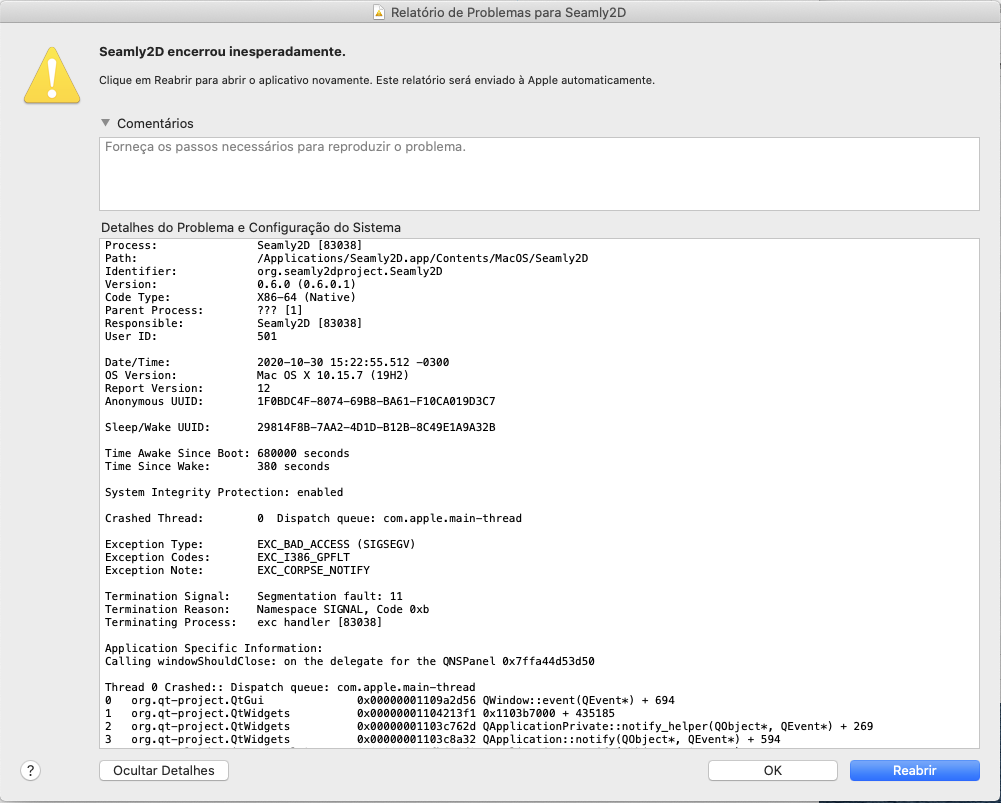
Can you provide a screencap or details of what the crash report is?
Thanks Aline… Clearly the report is showing a seg fault error… usually meaning a bad pointer. Could be that the code handling the dialog is deleting the dialog again after closing / rejecting (ESC) the dialog has already deleted the dialog.