Hello everyone! Is there a way to see all formulas used in a draft? As a means to double check my work, for example.
Many thanks!
Hello everyone! Is there a way to see all formulas used in a draft? As a means to double check my work, for example.
Many thanks!
Nein, die gibt es nicht. Wäre aber eine tolle Sache. Längen kann man in den Maßen nachschauen.
It’s an interesting idea, but No. It would a take a pretty deep parse of a pattern to extract all the formulas. Also - When you say “all” should that include the formulas for Seam Allownces, the length of grainlines & arrowheads, or label sizes for each pattern piece?
There’s more than just formula lengths… there’s angles, and all the formulas related to pattern piece details and custom variables.
Hello, @daisymay1234
You can check by going to Menu > History > History. This will produce a list of all items and most of the formulas, however this can’t be exported, only viewed. You can take screenshots of it and print them, if you wish.
The History does not contain the formulas. If it did it would get overwhelming IMO as there is not just 1 formula per tool. Depending on the tools there can be 2-3 or more formulas like with all the CP lengths of a multi node Interactive Spline. Displaying all those formulas in the dialog is going to take up more vertical space and reduce the number of tools visible at any give point in the list.
Also the History only displays the current draft block.
The (Custom) Variables table however does display the formulas which can be exported to CSV.
I am simply interested in finding my typos and inputting mistakes, not to see the formulas that run behind my pattern which generate seam allowance, etc. Maybe I haven’t understood correctly that I can input the formula in the variables table. Does that work? Then I would have an overview…
You don’t enter formulas per se in the Variables table other than for custom variables.
The Tool variables are automatically created by the tools, and are there in the variables table simply for reference.

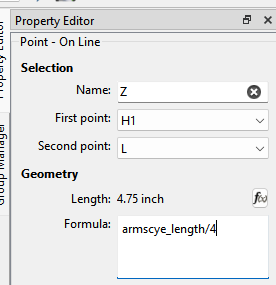
Formulas are found where ever you see the fx (formula editor) button. In addition to custom & tool variables, formulas may contain measurements from an ME measurement file. For ex:
The length here is the armscye_length measurement divided by 4.
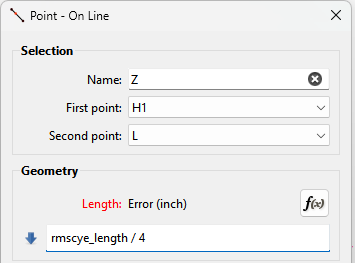
If you made a typo of a variable or measurement in a formula you will get an error:
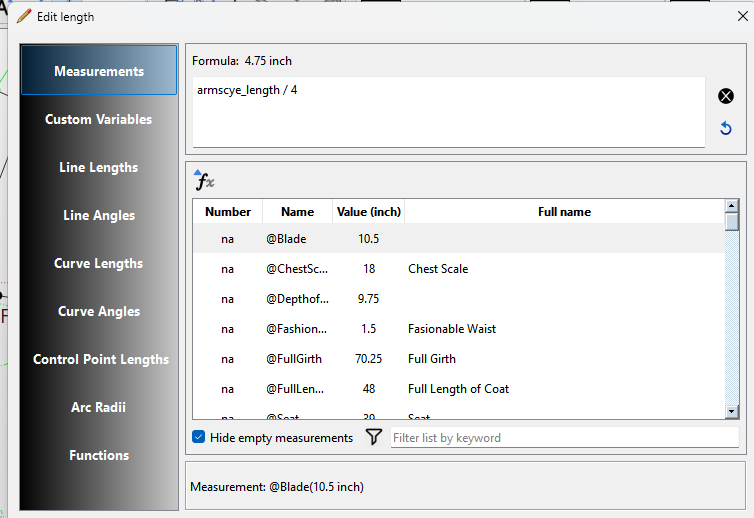
If there is an error you have to FIX it to save the tool. The fx editor is there so you DON"T make typos or errors in the formulas. The editor allows you to select measurements and variables and insert them into a formula. The editor also limits what is valid to insert.
If there is a typo of a custom variable or custom measurement in a formula it was made when the variable or measurement was made. If you have subsequrently used the variable or measurement in formulas, and you want to correct it, that is best done by editing the XML(s) in a text with search and replace. Personally I wouldn’t bother as they are just variable names… it’s not like someone is going to see the pattern and say “that variable has a typo” unless they have OCD. The best thing to do would be to proof read any custom variables or measurements before using them.