There are functions available, like abs()
There are built in constants, like _pi
Also, there is an ‘if then else’ construct, example: “if (a > b) then y else z” is expressed by: ( a > b : y | z)
See these links for more info on what you can find in muparser:
I saw this when you posted this before… this can be very handy where say the difference between waist and hips exceeds a given amount, 2 darts are used instead of one. Or on a taller person 6 buttons are used on a vest instead of 5.
hi, can someone help me to apply the if then else function? I tried, but I am not really getting anywhere.
In excel I would type my goal like this: =IF(PK<=4;0,5;IF(AND(PK>=5;PK<8);1;1,5))
I copied the expression like stated above and tried, but it wont resolve.
( a > b : y | z)
Can I achieve this with Seamly? For now it seems the program doesn’t like the colon. I replaced that with a semi colon, but then it didn’t like the straight dash (not sure, how that is called coorectly). Also, I tried with removing the spaces, but nothing seams to bee a proper function.
Yeeessss… It’s very similar to the If, Then, Else statement, in fact, exactly that
It’s a case of If BackWidth<100cm, then 100/10*2+2, else 100/10+10+2 because if it’s not less that 100cm then everything 100 & up needs the 2nd condition. (You’ll just need to place the brackets in the right places so that the system knows the order in which you want the calculations to happen in.)
OMG we can use IF statements.?!!!
My world is complete lol
I was wondering how I could use one pattern and not have to redesign the whole thing for certain types of adjustments. Now I have to learn how to do it. but that is for another day…
Thanks
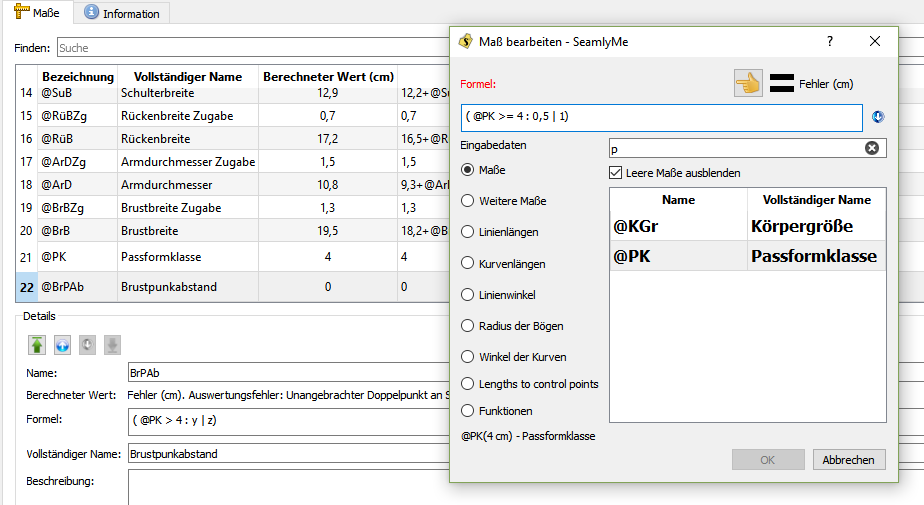
 It works with this expression
( a operation b )? c:d
It works with this expression
( a operation b )? c:d
