“I have two mating pattern pieces with slightly different seam lengths due to stretch distortion. Can Seamly2D automatically true up those seams to match while keeping the rest of each piece proportional?”
2 Likes
Welcome @joetroba
No. The Union tool simply combines the paths of the 2 pieces. For example I have 2 pieces and I joined them along A3 / A2 and A / A2… it does not alter the paths of either piece:
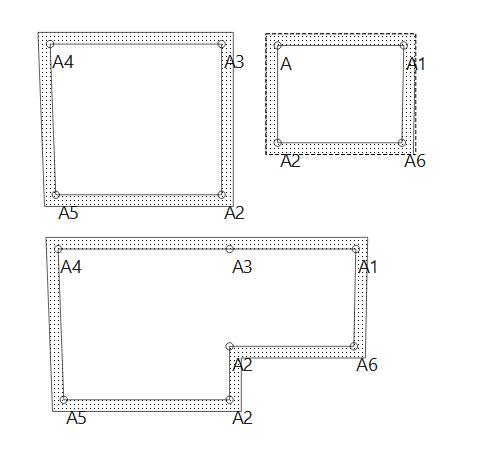
Note: There are known issues with the Union tool… specically related to uniting 2 pices that contain internal paths. I advise to avoid using the Union tool if either of the pieces contain internal paths.
2 Likes
Hello and welcome to the Seamly forum, @joetroba
No, Seamly won’t be able to control the fabric while cutting it out and sewing it. The only way that I know of to do this is to attach paper to the fabric before cutting it out and sewing it. If you’re using a cover stitcher or serger, remove the paper as you stitch to avoid getting the paper in the stitches. Otherwise use a water soluable stablelizer instead of paper.
It’s funny how everyone sees op’s question differently 
My reply would be: of course, create a variable that represents the stretch factor and use it in your formula
3 Likes
Language differences and terminolgy.
I see it the way I do because in Seamly terminolgy there are no “pattern pieces” in draft mode. They only exist in Piece mode. So there is no using formulas to automatically adjust the lenghs of 2 mating seams.
2 Likes
@nejcek74  Kudos for patternmaking excellence!
  Variables were designed specifically for this!
- Stretch variables, like for swimsuits, can make your pattern a bit smaller. Consider using side-to-side and up-down stretch variables for 2-way knits.
- Shrinkage variables (for woven fabric that you can’t pre-wash) can make your pattern a bit bigger.
- Fabric thickness variables can be used to increase the seam allowances a small amount when using thick fabric, like fur.
For anyone not familiar with Variable formulas:
Don’t reference pattern objects (A1, Line_B7_B10, AngleLine_X12_X13, etc.) in variable formulas!
Otherwise, your pattern will run properly only inside a Tardis.

1 Like
How does this apply to truing up seams in “pattern pieces”?
That being said - If two sides of a seam in the blocks don’t match in length, you don’t fix by fudging one side or the other of seam by stretching or shrinking the length with variables… you fix the draft.
For ex: Fitting a sleeve to an armhole. You’re not going to use to variables to adjust the length of the sleeve or armhole to fit… you probably have to adjust the control points of the curves.
2 Likes
“create a variable that represents the stretch factor and use it in your formula”
1 Like
Yes… I get you can create stretch or shrink variables.. but that’s not how you true up seams. If 2 sides of a seam don’t match (within a given tolerance) something in the draft is wrong. You don’t add a stretch factor to fix it.
1 Like
@Douglas I understood the rubric differently 
The pattern pieces were drafted with different seam lengths to accommodate stretch factors.
But we can draft the pattern pieces using variables so we don’t have to deliberately draft unequal seam lengths.
Using variables is a valid option, and the preferred method, to handle this problem. Seamly is designed so that ‘Truing seams’ is automatic.
1 Like