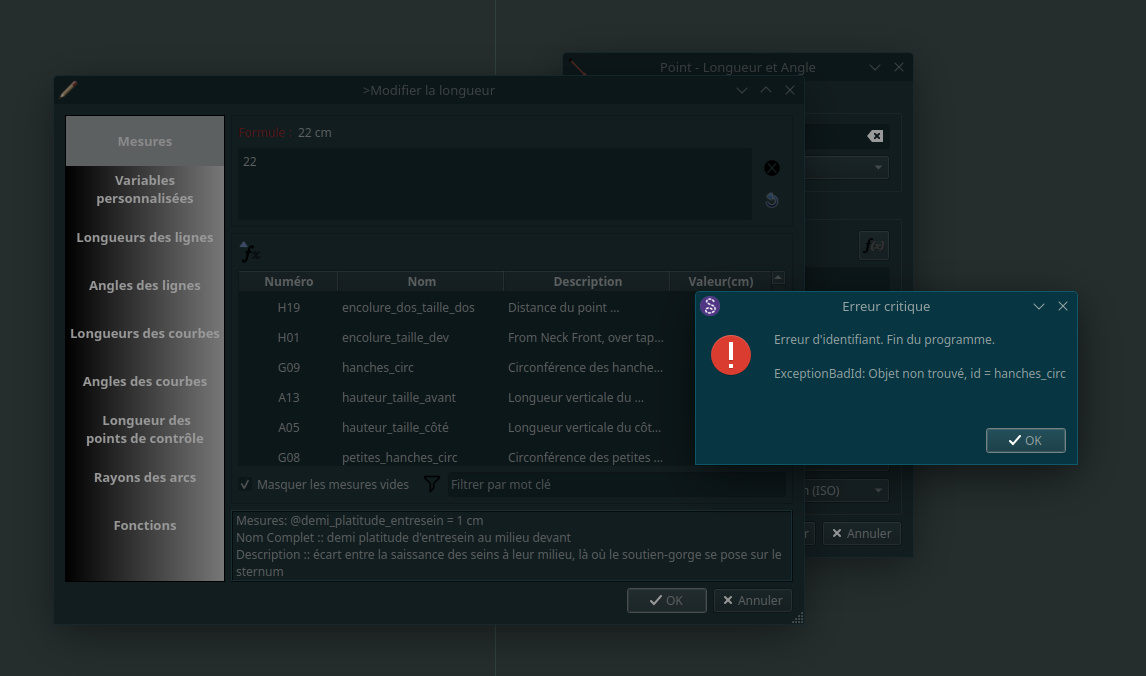
I just upgraded to the latest version and Seamly now does a critical error and closes when I try to open measurements. I load a sheet of individual measurements - the main file with which I was working in the earlier version, navigate from the new point dialogue box to “measures”, click on any of them and the program immediately crashes with this message
How do I fix this ?
I’m on Ubuntu studio and the install is an AppImage
I’m looking at the issue now. I think it’s because I set the measurement name to the translated name, and when calling the routine that writes the info in the textbox below the table, it’s searching the data base by the translated name when it expects the the untranslated name.
Reminder to self… check any new feature with another language before making a PR.
Yup… that’s what the issue was - trying to get the variable by the translated name rather that the English source name.
Hopefully I can get a PR up and we can get this merged to make this next release.
As an aside… because I randomly selected Spanish to test with, I noticed that a lot the translations for the Spanish ME names could use some translating. Any Spanish speakers out there? Since we now use Weblate it’s relatively easy to use the online Weblate site for users to edit the translations and it will automatically create a PR on Seamly’s Github.