New Feature Suggestion: Verify Pattern Drafting Accuracy

Hello, I would like to suggest a new feature. I am relatively new to Seamly2D, so please let me know if a similar function already exists. Thank you very much!

My native language is Chinese; I am using Google Translate below and hope I have described the idea accurately.

It would be great to add a separate “validation” panel to the right-hand interface of Seamly2D. Ideally, this panel would function similarly to the SeamlyMe interface, allowing users to define specific elements—such as armscye curves, side seams, or custom-named items—and set “correctness criteria” for them (e.g., “must be greater than,” “must be less than,” or “must be equal to” specific other items).

Once the pattern drafting is complete, users could bind specific line segments or curves to these custom-defined names. The system would then evaluate whether the result is “correct” or “incorrect” based on the previously set criteria. If the result is incorrect, the user could return to the editing view to make adjustments and re-evaluate. (Ideally, the validation panel would automatically update the pass/fail status immediately after binding.) The values ​​used for validation could be derived from formulas or based on specific measurement values ​​from SeamlyMe.

Here are three envisioned use cases:

Scenario 1: Definition: The length of “Side Seam A” must be exactly equal to the length of “Side Seam B.” After drafting, bind the combined length of LineA_A1, LineB_B3, and Spl_A25_a2_A6_a2 to “Side Seam A,” and bind the length of Spl_A74 to “Side Seam B.” System Output: Determine whether “Side Seam A” equals “Side Seam B.” If they are unequal, display the difference.

Scenario 2: Definition: “Angle A” + “Angle B” must equal 180°. After drafting, bind the angle of AngleLine_A2 to “Angle A” and the angle of AngleLine_A10 to “Angle B.” System Output: Determine whether “Angle A” + “Angle B” equals 180°. If not, display the individual values ​​of “Angle A” and “Angle B” and their sum.

Scenario 3: Condition: “Front armscye length” + “Back armscye length” ≥ “Total armscye length in SeamlyMe” + 2 cm. Definitions: Spl_A1 represents the “front armscye length”; Spl_A22 plus Spl_A18 represents the “back armscye length”; the total armscye length value in SeamlyMe is 54 cm (so, 54 + 2 = 56 cm). System Check: Determine whether the sum of the “front armscye length” and “back armscye length” is greater than or equal to 56 cm.

If logic like this—capable of verifying whether a pattern fits well and is suitable for sewing—were implemented, Seamly2D could easily outperform most CAD software currently on the market; I believe this would make Seamly2D much more accessible for beginners.
The functionality does not currently exist, but the issue has been talked about in several topics. It’s on the “To Do” list.

Hello and welcome to the Seamly forum, @Lisa_Chen

I’m a long-time user of Seamly and I understand your logic, however, I don’t have any control over new features and programming of the software. With that said, I have a bit of a work-around that shows me exactly where things don’t balance which works very well for myself and a number of uses who have learnt to do the same…

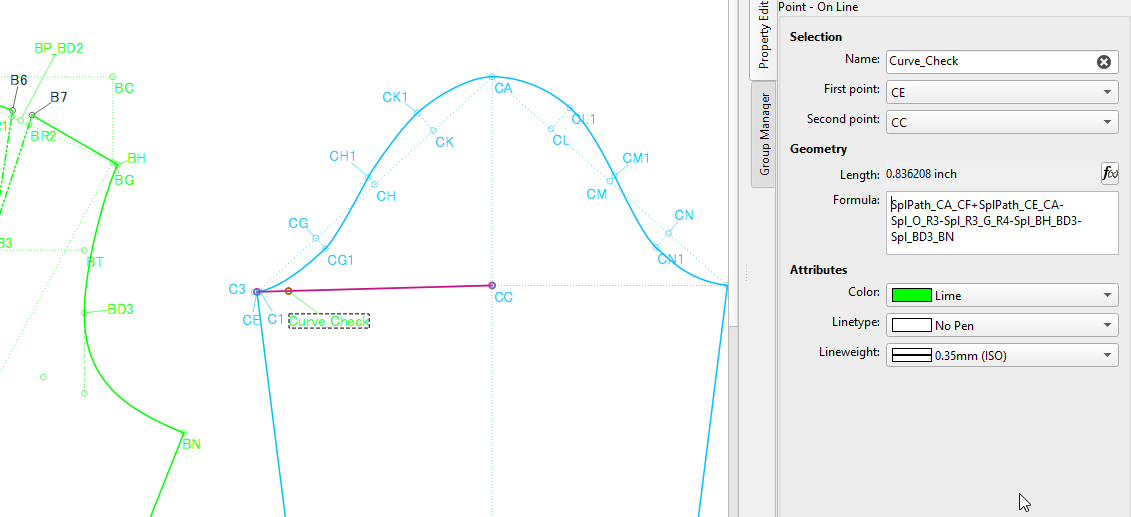
For instance, in the image below, I have a Curve Check where I deduct all of the added up all the curves of the armholes from the sleeve cap curve to make sure that the difference is acceptable for easing the sleeve into the armhole.

I place similar checks all over, like with the bodice side seams, the waist of a skirt to the waist of the bodice, trouser side and inseams.

If named appropriately and the formulas are correct, you can see at a glance if the area that you are working on matches the area that it will be attached to during the sewing process, and if you use the measurements in SeamlyME to create the formulas at the correct places, there shouldn’t be a fitting problem.

I hope that this will help you while someone hits on a bright idea on how this can be incorporated into the software.

Sure you do… indirectly. :slight_smile:

Thanks for the detailed tutorial! I’ll start learning and putting it into practice. However, I still hope to continue developing this new feature.

Ich arbeite auch mit solchen Kontrollmaßen, wenn ich z.B einen Ärmel in ein Armloch einpasse und die Einhaltweite korigieren möchte.

Wenn ich Längenmaße auf einander abstimmen möchte, helfe ich mir oft mit Bögen, die ich im Radius auf das gleiche Maß meiner gewünschten Länge setze. Mit Tangenten und Schnittpunkten arbeite ich dann weiter.

Like I said we all have used some variation of this to create 2 lines made of of the sum of the lengths you want to compare.

This is what is commonly referred to as “Walking the pattern”.

I’ve proposed ideas in the past… which given my increased knowledge of Qt and the codebase may have changed my thoughts since , but I see replacing having to draw 2 lines with a formula to sum up the length with a Dock where you can add to a list of comparisons. The comparisons would be simple… there would be 2 vectors (paths) of points & curves (like in the Pattern Piece → main path) where the app calculates the length of each path segment, compares the 2, and displays the difference. So just like tracing a path for a pattern piece, you would trace 2 paths… or “Walk the pattern”. An option could be to add a limit to the difference so the display changes to indicate if the difference is withing tolerance. Maybe the difference value is displayed in Red?

Of course that’s just the basic concept… all the UI and details would have to be worked out.

And as I think about this I see another use for a subclassed “Drop Down Table” widget I plan on using for adding objects to Groups… where I can see each of the 2 paths in a drop down table… the lineedit displays the length of that path… and a seprate QLabel could display the difference between the 2. Edting each of the paths is a must… a user has to be able to insert or delete nodes from either of the paths.