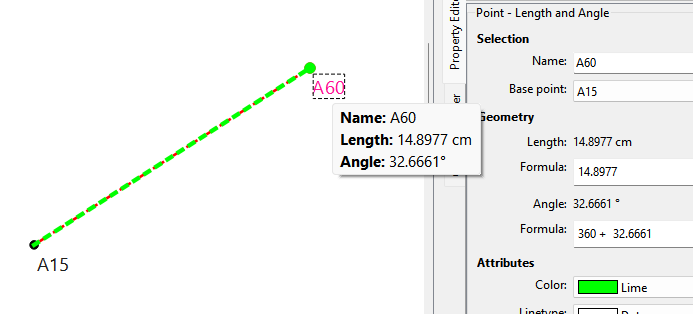
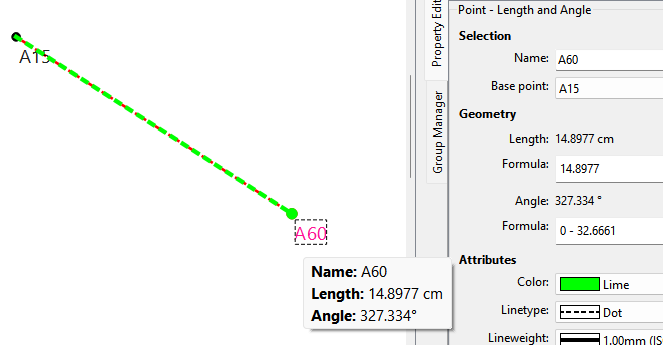
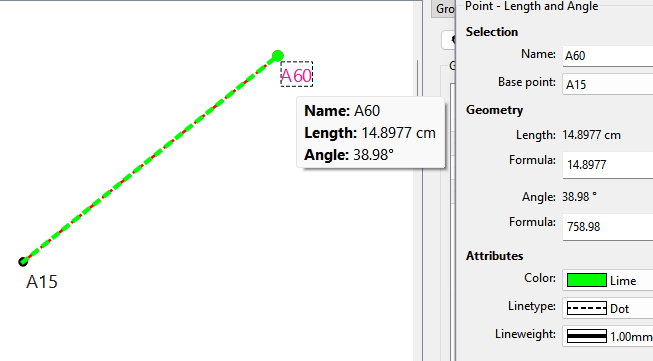
Well this one was over due. About 5 years ago I added a function to normalize the calculated value of angles to the display the angle normalized between 0 and 360. At the time though I didn’t know how to apply the normalized evaluated formula only to angles… or where to even find the part in the Property Editor code that actually sets the calculated text.
Now I’m having trouble wrapping my mind around 999 being equal to 99999, but they both have a remainder of 279 when divided by 360, so it must be true.
As far as I could tell, trying each tool as best I could, the AppImage is working as indicated. (Except Images, which has always been a bit different anyway.)
Hmmm. That is correct. The ImageDialog does not use formulas… thus there is no calculated value. The min and max values for the spinbox are set to -360 (CW) and 360 (CCW). Yes we could have made it 0-360, but I’m not going to change it now, lest we then have to add a new schema and conversion to normalize the negative angles. Dealing with -360 to 360 is not that big a deal… it’s wrapping your head around angles like 546.89.
Technically we could normalize between -360 and 360 as that’s how I wrote the routine:
qreal DialogTool::normalize(const qreal value, const qreal start, const qreal end)
{
  const qreal range       = end - start   ;
  const qreal offsetValue = value - start ;   // value relative to 0

  // + start to reset back to start of original range
  return (offsetValue - (floor( offsetValue / range) * range)) + start ;
}
But in the issue Sue wanted 0-360.
Then in the Eval() routine which is generic for any formula I thought of a simple solution to only normalize angles:
if (postfix == degreeSymbol)
{
    result = normalize(result, 0, 360);
}
label->setText(qApp->LocaleToString(result) + " " + postfix);