Hi I am so new to this and love sewing! I have Winifred Aldrich’s 4th and 6th edition. Is it possible to change the Base letters to numerals, if possible how is this done, please.
2 Likes
Welcome @Flo58
Hmmm… you can change the Base to any thing starting with a valid “alpha”.. but not a “numeric”. Unfortunately this is fuction of the math parser and how it handles valid tool names. The parser has no way to distinguish and tokenize a tool name of say “23” and the value 23.
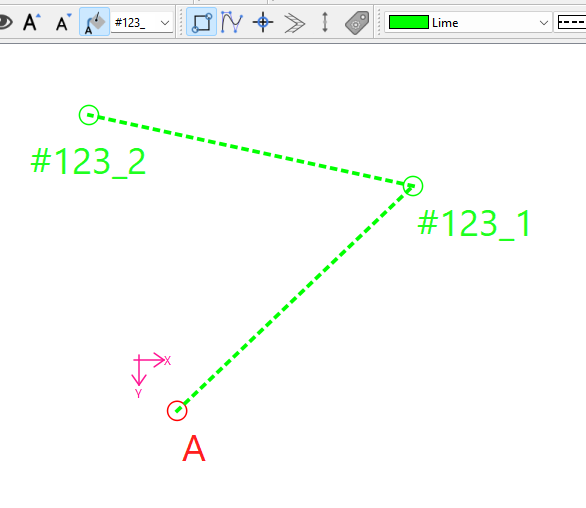
Don’t know if this helps… you can change the base by entering a new base in the Pointname combobox. Here I used the base of #123_:
2 Likes
Hello and welcome to the Seamly forum, @Flo58
Besides what @Douglas has said, you’ll also pick up a problem when following Aldrich’s (or most other authors) instructions if you remove the Alpha part of the number because the instructions start again at 1 from each pattern piece draft.
I solved this problem with Aldrich by using A prefix for the bodice front, B for the bodice back, C for the sleeve, etc. etc. This way, the numbers run the same as in the instructions. Sometimes, you need to create a new point actually complete an instruction. In these cases, I used a, b, or c in lower case, followed by the next generated number.
I hope this helps you.
2 Likes
Thank you Douglas for your response, as I was playing around and watchd a few you tubes, I thought this may have been the case so I allocated the numbers to the letters as A0 B1 C2 D3 etc. I haven’t fully done a set up as yet but this is what I had enter to start me off. Bit of learning to do but I am looking forward to it.
2 Likes
Thank you Grace, yes I am going to try A0 B1 C2 D3 etc at least until I get used to it. Looking forward to my journey, Cheers Flora
2 Likes