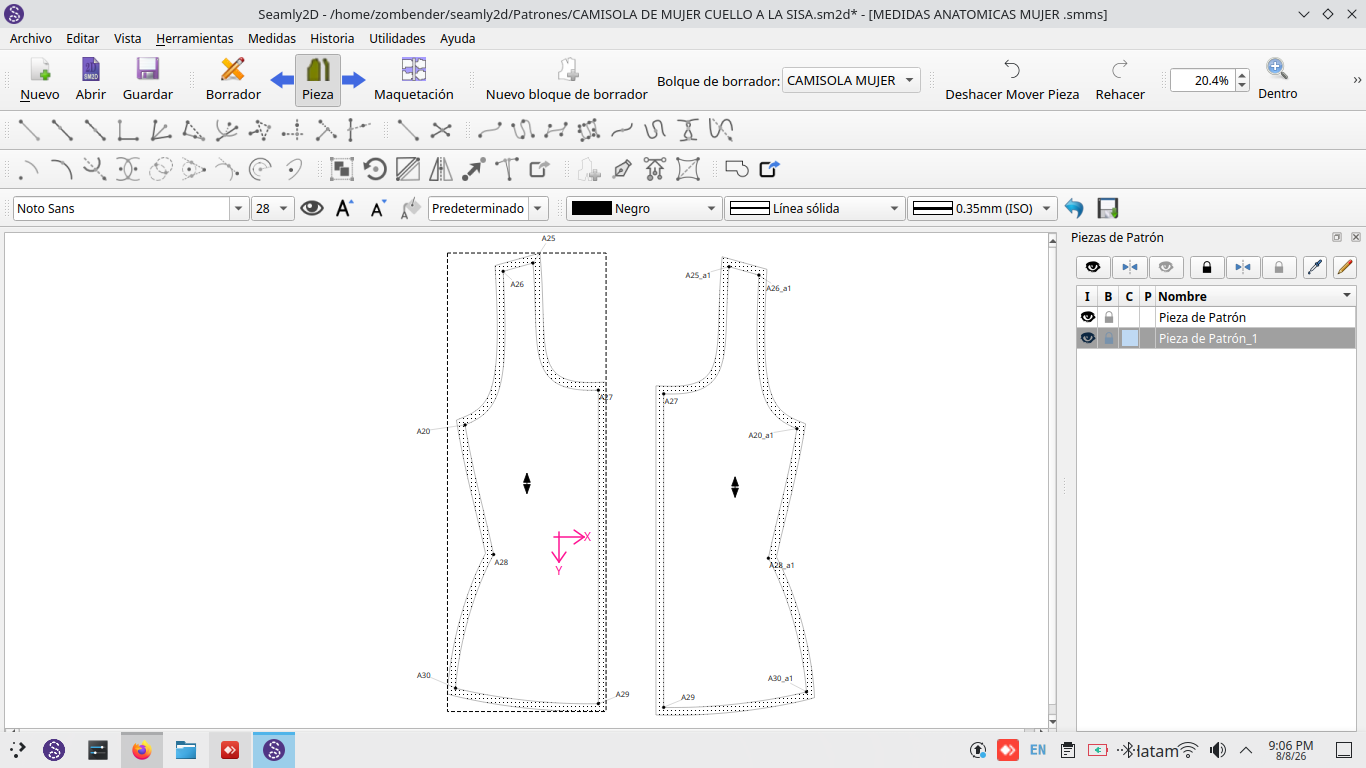
Hello, lovely community! I’ve managed to create and export my first set of patterns, but now I’m trying to join pieces from another design and the program keeps crashing. If anyone has encountered this problem, please help.
Hello, lovely community! I’ve managed to create and export my first set of patterns, but now I’m trying to join pieces from another design and the program keeps crashing. If anyone has encountered this problem, please help.
To be clear… are you trying to combine pattern pieces from one pattern file to another? If so Seamly is not currently designed to do this.
Or are you trying to use the Union tool?
Hi Douglas, I’ve tried several times but haven’t been able to get it to work. I’ve performed this action with other parts before, so just to be clear: first I select my right-hand part and its two connection points, then the next part and its corresponding connection points; the “Accept” box appears, I click “Accept,” and the program crashes.
OK. So you are trying to use ther Union tool. There are known issues with the tool - espcially if there are internal paths within the pieces. Until we can replace the tool we generally recommend to avoid using it, by drafting what would be your united piece with the mirror, rotate and move tools in Draft mode, and create the piece from the draft.
Also I’m not sure how old the version of Seamly you have, but older versions had more issues.
I’m not entirely clear on what you mean regarding the “mirror” tool—or reflecting the object across the axis. Do you mean selecting the entire piece (both left and right sides) at once so I don’t have to use the “union” tool? The reason I’m concerned is that I was able to use the tool just last week, yet I ran into this error only three days ago.
Regarding internal routes, I haven’t created any since my layouts are simple and I don’t need them. I appreciate your help, Douglas; I can see you really know your stuff, whereas I’m new to this.
Yes… you can use the Mirror by Axis and select your points and curves of 1/2 a patten and mirror it for ex by the center front or center back. Now you can trace a pattern piece of both havles without using the Uniontool.
As an example:
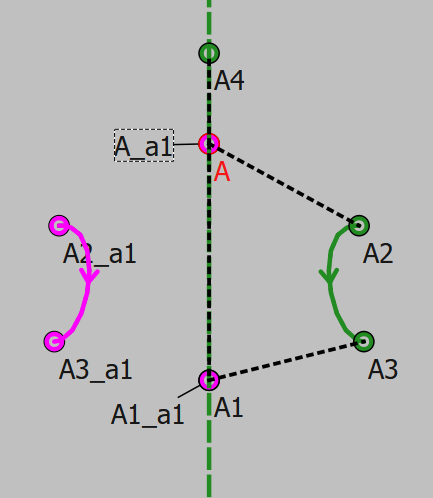
Using the Mirror by axis tool:
I mirrored the objects A, A2, Spl_A2_A3, and A1 around the point A4:
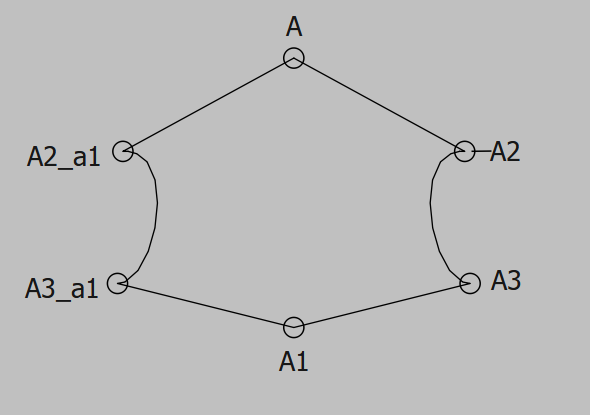
Then created a piece with the path A, A2, Spl_A2_A3, A1, Spl_A3_a1_A2_a1:
This was just a simple example, but with some clever thinking you can also use the rotate and move tools to copy and move a group of points and curves around… then connect them as a pattern piece.
It’s all going to depend on the pieces you are trying to join. If you ceated a pattern a week ago and haven’t changed it and now it won’t open… then that’s a new issue. We haven’t touched the Union tool in quite awhile that I’m aware of. But I will check.
As a lead dev for 8+ years I guess that’s a good thing,  Actually though there are others that are better at using the application than me.
I appreciate all the help from this forum and from you; it really is a somewhat complicated application, but I think that with more practice I’ll improve and eventually be able to help others, too. I’m going to work on your recommendation now and let you know if it helps. By the way, I used the Union tool last week and it worked fine, but now it isn’t working with these new drawings; I even tried using it on the files from last week to test it, and it didn’t work there either.