I happily use seamly for almost 3 years. I’m so grateful for all the work done it’s so great to have this kind of software. So here is my little feedback with some things I would love to do :
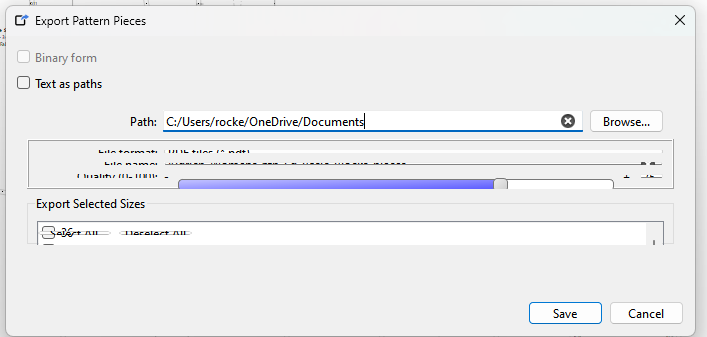
When i export my patterns, it would be nice to batch export several sizes at once instead of doing it manually size by size. Ex: export in svg from 34 to 48 (and it create a file for each size like “name of the pattern”_”size”.svg)
Support international sizes (S M L)
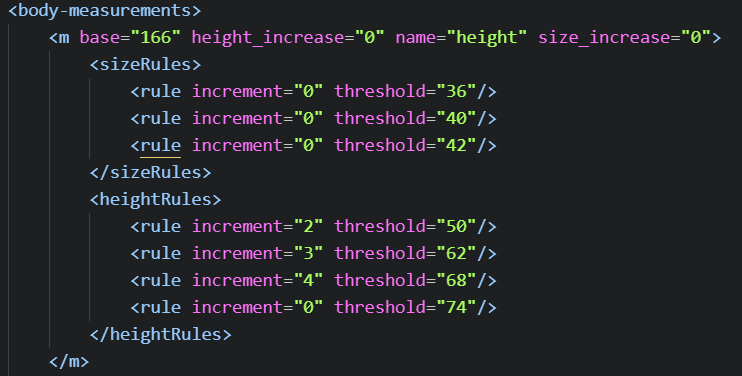
Allowing jump in grading. In seamlyme it would be wonderfull to be able to have the option to do jumps in grading It’s not always “6” all along sizes
Maybe the 2 last points can be solved if we can create our own size chart. So we can do it numerical, alphanumerical and can add every jump we need.
I hope this can help to improve some of the features.
Amazing! the button hole things are on progress right?
I’m not a developer but i want to try with AI to do something about the first point “batch size export”. I let you know if i succeed so you guide me to share my finding.
At the end I involved my boyfriend in it.. He send this in github
And make me an AppImage that work perfectly for these 2 points :
When i export my patterns, it would be nice to batch export several sizes at once instead of doing it manually size by size. Ex: export in svg from 34 to 48 (and it create a file for each size like “name of the pattern”_”size”.svg)
Allowing jump in grading. In seamlyme it would be wonderfull to be able to have the option to do jumps in grading It’s not always “6” all along sizes
I don’t know how is the process to do it for the general Seamly (I don’t even have the correct vocabulary to say it).. Maybe somebody more qualified can have a look to implement it.
I’m working on it. Since it was done with AI some of the code needs to be refactored. Especially the ui forms… they’re all wonky, and not space efficient. Ask your BF if he wants to be added to the list of Contibutors on the About dialog… and if so what name / or screen name to use.
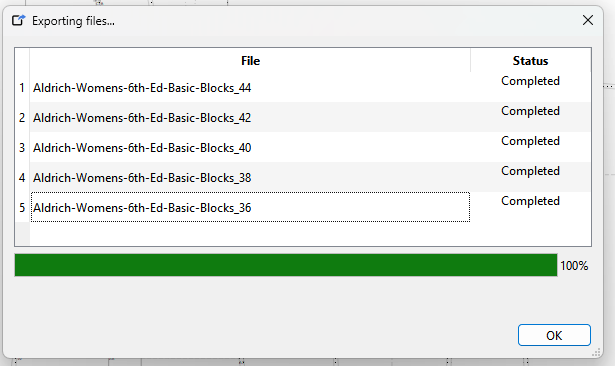
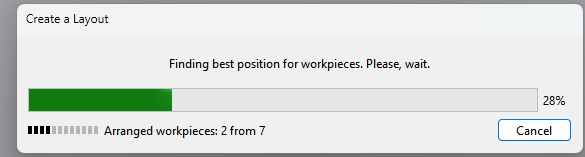
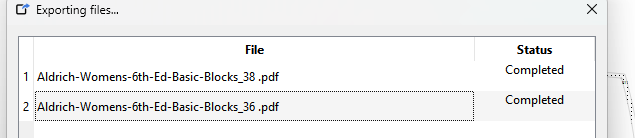
I did this with a progress bar for the pieces and without the progress bar for layouts as the layouts already have a progress bar when building each layout:
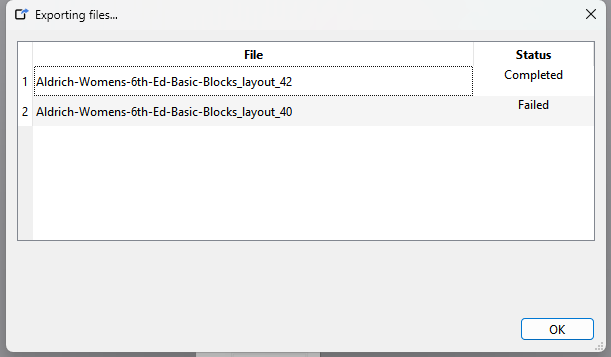
If an export fails… it reports the status as “Failed”
I looked at combining the 2 progress dialogs, but it will take a lot of refactoring the export routines as they reside in different classes… and have to be mindful that the layouts can be exported through the command line, so there is no GUI to display a progress dialog.
It was a hard work to convince him to have a look. I suppose he made it the easier way he can.
I asked him to do the export from the “piece” tab more than from the “layout” So that when i open the svg files i have them in the same place and can nest sizes easier….
Maybe it’s possible to do it with layout. I admit i didn’t explore too much this tab…
Not that you were asking for it… but I also have an idea now how to impliment a nested export. I also have an idea how to make it do multi exports from individual sizes.
It will do multiple exports from layout mode… it’s just I had to make it show the export dilaog after all the layouts were exported so the export progress bar is a moot point. The routine that does the layouts has it’s own progress bar dialog:
… and it would be annoying to have the export progress dialog open while each layout progress dialog opens on top as it builds each layout. The piece mode just switches sizes so it doesn’t have to figure out a new layout for each size.
This is the progress dialog after exporting in layout mode.. where I canceled creating the 1st size… as you can see it shows “Failed”… and no progress bar:
OR a .dxf Amaa with his .rul file (that combine all model info, name and number of pieces and all sizes for each piece). As far as I know, for the moment Seamly can’t offer this, I suppose because these kind of files are generated by NO parametric pattern software (Am I right?)
Yes… and that’s what I have in mind to be able to nest pieces in a single export file - color coded by size.
Correct… for now as far a the .rul goes. There is stuff in the works for the AAMA dxf.
DXF by nature is not paremetric. It’s similar to any other vector type format - like SVG. It’s why we can export from Seamly to DXF, but will never be able to import as there is no formulas data, and Seamly has a specific way to use that data to create all the graphic elements. A rul file is for manufacturing data—like seam allowances, notches, and grainlines, but does not contain the formulas neccessary to create a pattern.
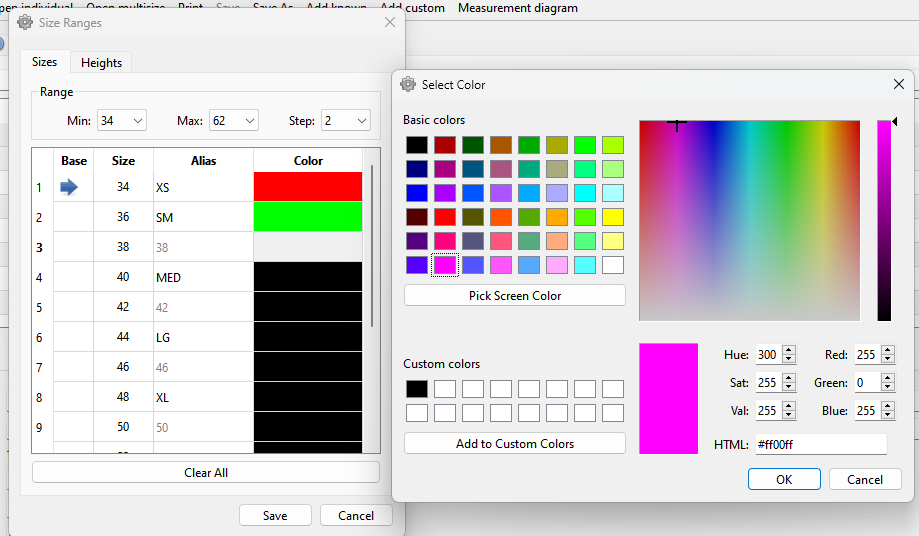
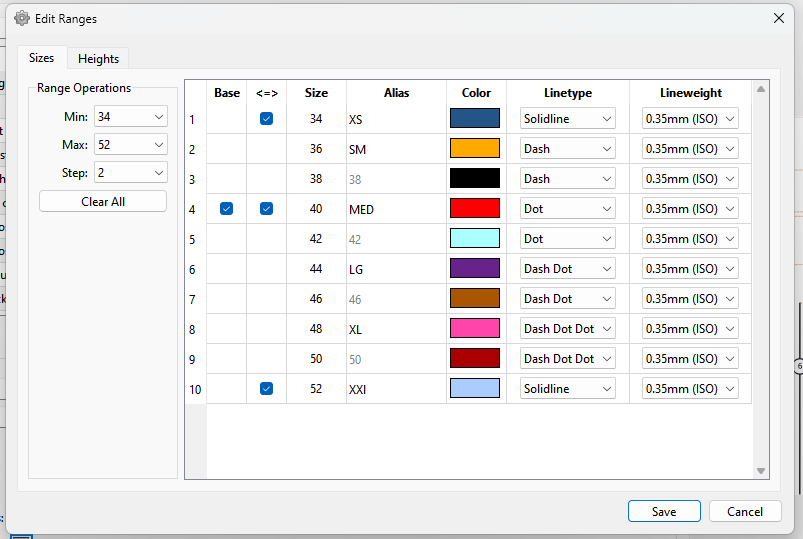
I’ve been working on cleaning up & integrating the BF’s code into SeamlyMe… here’s a WIP sneek peak to an updated “Size Ranges” dialog with the addition of a size “step”, a base size/height selector, and a size color column (for future nesting use) with the color selector:
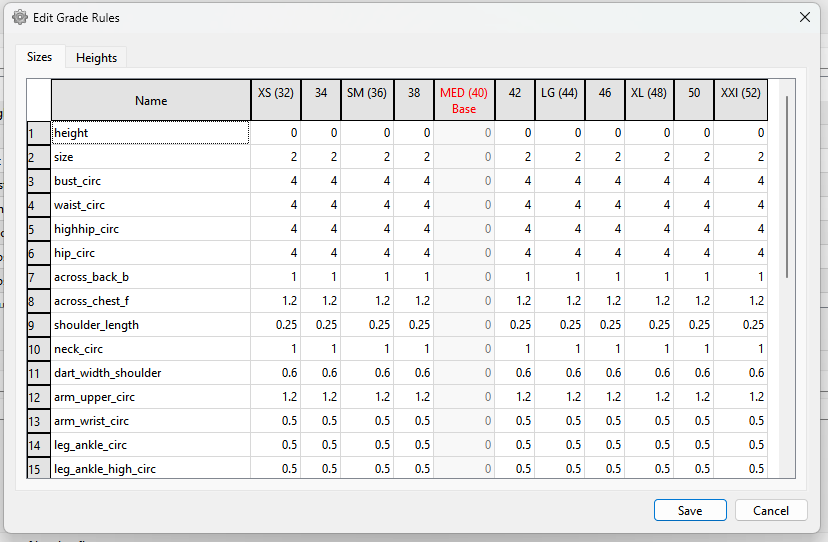
I plan on scraping the size / heights "Grade Rules " dialogs and integrating the functionality directly into the main measurements table with color coded columns for each size to enter the increments in one table VS having to open a size & height rule dialog to set the increments for each measurement - which is tedius. For ex… the measurement file I’ve been testing with has 28 measurements… that means one would have to open a grade rule dialog 56 times to set all the increments across the ranges of sizes, heights, and measurements.
I’ve made some more changes and additions to the Ranges dialog.
It will now remember the size when resized.
Rearranged the layout to better suit some future additions such as inserting or removing sizes / heights from a range.
Added a Break point (<=>) column for future use of automating changes to the grade rules. Break points are sizes at which the grade rules normally change, and always include the smallest and largest size along with the base size.
Refactored the color column as a cleaner looking icon .
Refactored the Base column to a Checkbox. Currently I’m just showing which is the base size… need to refactor the code so you can (mutually exclusive) check the Base size in the Range dialog VS setting it when you create a multisize ME file.
Added columns to select the LineType and LineWeight which along with the Color will can then be used in exporting a given size with it’s own line attributes.
After figuring out how to run ME in the debugger and resolving an issue I was having - I’ve been busy again on this feature. Instead of the tedius process of opening a dialog for each measurement… once for each size and once for each height… that is one of these for each size & height for each measurement:.. or 56 dialogs for the ME file i’ve been testing with :
Also gotta love AI… NOT. “values must be non-decreasing”. ??? You mean they must be “positive”? The spinboxes here already set the min value to 0… there can be no “non-decreasing value”.
I combined that all into a single dialog with 2 tables, where you will be able to edit a grade rule right in the table. Not only that as a side benefit the values are not getting rounded to 1 decimal place. Like 0.25cm->0.3cm.
Just have to rewrite the routines to read and save the Grade Rules to and from the tables, and it should basically all be working.
This is looking amazing!!! Thank you very much, @Douglas , for the sneak preview
However, I have a small problem with this. When you get into the Plus-Sizes, certain values do decrease in the increments, so we’ll need negative values, please.
That may require altering the the way the code is applying the increments. Right now it’s expecting positive values.
Ok… I set the validator on the tables to accept real numbers with 3 decimal places from negative infinity to positive infinity. When I get to the reading / saving part I’ll see how it handles the negative values.
BTW Does anyone see any value in capping the min and max number to something more resonable? Like -100.000 to +100.000 ? Of course if I do that I can see someone saying… I grade hot air balloons and need larger steps.
So, if someone is working with mm, about 4"? Even most folktale giants I’ve met, who have been described as tall as the clouds, still were around twice the size of humans in general, so a whole meter of grading would still be ridiculous. If we ever meet any planetary class giants, we can fork off SeamlyGiant for them.
In the mean time, anyone wanting to plot out their home’s dimensions in Seamly should be fully cognizant of the fact that they are not using it for its intended purpose, & thus it can be expected to be an… odd… experience.
I am not one who knows if 100mm is sufficient for grading, I’ll leave that for those who use it.


 I also have an idea how to make it do multi exports from individual sizes.

 :
: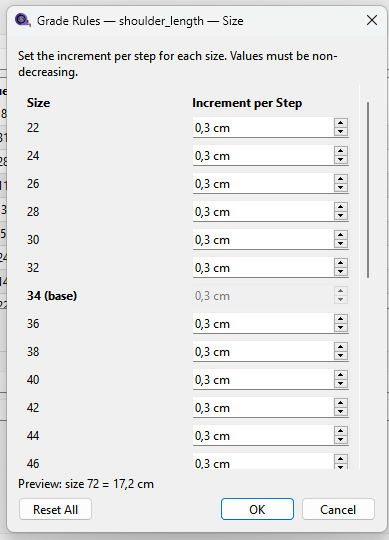
 The spinboxes here already set the min value to 0… there can be no “non-decreasing value”.