It’s annoying to right click->properties->changing value->apply->OK->mouse move->loop to fit the image to specific position.
For example, if I want to put a french curve image to the armhole, I will need to loop several times because I cannot move the image while the image properties dialog is visible, and to put the curve image to proper position, I will need to scale, rotate, and put it to a proper location.
Some possible solution:
make it possible to drag and drop the image position when the image properties dialog is visible
show the image properties dialog at the right tabs just like group manager & property editor when clicking on the image, and apply the operation without clicking apply. or
show image properties in property editor, and again, apply the operation without clicking apply (or a checkbox that allow you to apply operation without clicking apply)
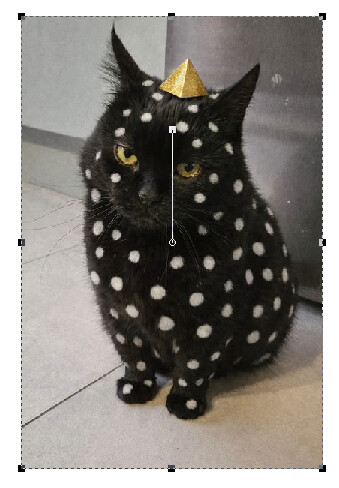
Note: although wiki says you can rotate by clicking the image, but in the code base there is no method implementation for m_angleHandle() (src/libs/tools/images/image_item.cpp).
That doesn’t even make sense. Move the image and open the dialog.- the dialog now shows the new position. Besides the dialog is modal… you can’t access anything else like moving the image.
The image tool does not function in the same manner as the draft tools, so there is no direct hook into the Properties Editor. The Properties Editor is a 3rd party lib that is very difficult to work with. It would be a PITA to create the form to duplicate the Image Properties Dialog.
I find myself with UI/UX frustrations and seems that the core developer doesn’t really care about their user’s user experience, especially an user know both code and CAD tool.
This is my first time working on an open source software, and need to record the video to proof that my frustration is valid.
Current Seamly2D - position the french curve image with the armhole
In inkscape with direct resize, rotation, and moving rotation origin without open and close the dialog
Seamly2D takes around 2 minutes, and Inkscape only needs around 1 minutes, without any interaction with a separate dialog.
Perhaps the title should change to: image: add mouse rotation, rotation origin; add image horizontal and vertical flip
Note: My thought to fork out Seamly2D is growing exponentially by UI/UX frustrations and the feedback/responses received from the core dev.
Seamly is NOT a CAD or Paint program so the emphasis is not on image manipulation.
Also if you are not using formulas for the curve CP’s, but rather just making curves match an image of a French curve, the pattern will likely NOT resize correctly to different sizes with various measurement files.
Could we dock the image properties dialog in the right column?
Could we enable free move & rotate capabilities for images in the canvas widget so that opening the property dialog isn’t necessary for move &/or rotation?
Not easily. Again the image tool does not follow the same structure as the rest the draft tools.
Yes… that was my orginal intent. It can be done similar to the grainline or labels.
I can’t say specifically how… as one has to deal with the man image and all the resize handles, plus some way to grab to rotate and keep it all in sync.
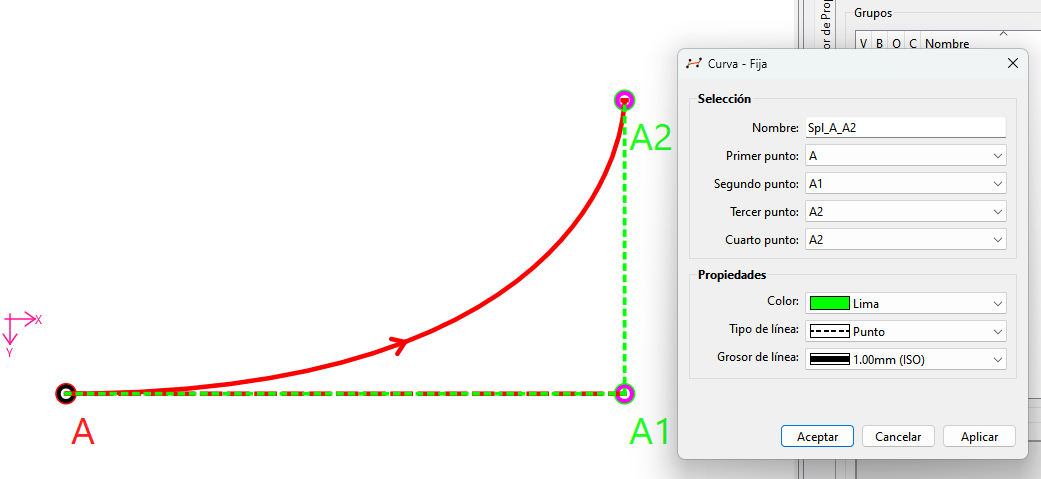
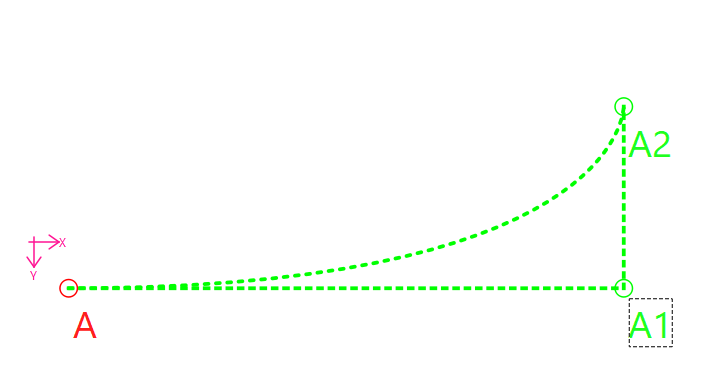
The solution is already there… formulize the control points. We just haven’t automated the process to fit standard shaped French curves. OR you can use Fixed Curves.
I agree that it would be great to be able to rotate images with the mouse. An issue should be created on Github, if it doesn’t exist.
The only reason there is no mouse rotation currently in the software is that we decided to deliver the image feature as soon as it was usable instead of waiting for it to be perfect before releasing it. We thought users would prefer having an image import that doesn’t have a mouse rotation for a while than having no images at all.
The main intent of the image tool was to “digitize” real world patterns. The perspective correction tool that I’m currently coding will automatically rotate, resize and correct the perspective of the images. The feature is almost ready. It should satisfy users who rotate images to align them with their patterns, before the rotation handle is implemented.
The ability to dock different dialogue boxes to the right-hand tab (or wherever one wants them) has been at the top of my wish list for a long time. This would allow them to remain open at all times without resizing or popping up, etc. This applies to all the all different properties dialogues , the variables dialogue, the piece properties dialogue, and so on.
I work on a large monitor with lots of workspace which is at the time mostly unused. Yet I constantly need to move dialogue boxes around to see what I need to. As mentioned, this is a well-established solution that is enabled in all CAD or graphics programmes.
This is not possible. Most tool dialogs are “modal” which means they block input to other visible windows in the application. There’s a reason for this… you can’t be editing the properies of everything all at the same time. -which woud be the case if every dialog was non modal. Does a file dialog stay open after you’ve selected a file? No. Likewise you can only edit the properties of a tool in the Propery Editor one at a time. Wnhe the Editor looses focus, the dock is cleared. There are only a few select dialogs that can stay open - or are “non modal”. The History and the Variables Table.
That said… @mlouielu would like the Image Tool to display it’s properties in the Properties Editor. This is a reasonable request, but as I previously stated it’s hard to implement as the Image Tool is constructed differently than the rest of the tools. The Graphics view doesn’t emit an itemClicked signal that is connected to the Property Editor like the rest of the tools. Also to display the Image properties in the Properties Editor will rerquire an addtional plugin “checkbox” property for the Lock Image, Lock Aspect, and Units that I don’t believe exist right now. Again it’s not that it can’t be done… it’s just a lot of work for feature with a low priority at the momment.
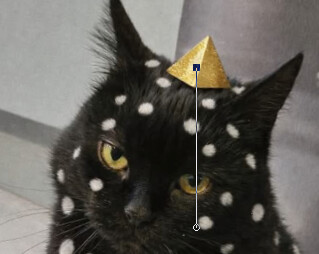
I don’t know but LLMs are quite good in nowadays, I didn’t check the code quality or details, but at least I can rotate by the handle:
prompt: for src/libs/tools/images/image_item.cpp , currently when click the image once, it will show the resizeHandle, is it possible to add a feature to rotate the image after second click on
it? so the order will be: one click-> resize handle, two click->rotate handle? and then actually rotate the image? this is well established in Inkscape
The french curve example can then reduce to 20 seconds:
In my use case I don’t really care about resizing for multisize or precision or so. There is only one size to fit myself. And this workaround is way better than me just blindly using Bézier curve to drag it out.
Appreciate @Douglas to bring up fixed curve tool, I tried it but realized that, unless I know the parameters of the french curve I am trying to follow, it’s impossible (or at least needs a lot of round of try and error) for me to use fixed curve to replicate it.
I am not proposing to replace fixed curve by rotating the image. I know this is a dirty workaround for my need, which isn’t ideal for commercial or substantial use in the long run. But still I think it could help other users.
Since I’m currently working on the image transformations, the coordinate systems etc., I’ll implement the rotation handle at the same time. It should be ready soon.
Would you implement this as a separate handle? - which can easier to implement, has more control, but harder to use OR like the grainlines & labels that switch mode by a second mouse click? - harder to implement, but easier to use.
In case you need any ideas… The old Picture Publisher paint program I still use, uses a circle for the rotation point (default is center of pic) and square handle that use use to rotate with. Either can be moved. Moving the circle changes the rotation point. Moving the square changes the leverage or the speed at which the image is rotated. The square can move outside the image for even more finer control.
The biggest issue is that since the rotation handle is outside the image it would be impossible to click on it with the current behaviour as the handles are only displayed when we hover the image. I would have to make the handles appear when the image is selected, but I fear it will not be that easy because I would need to make the images selectable and it may interact with other parts of the sofware.