I’m new to using Seamly, and I can’t find a way to scale my pattern to a size smaller than 22 (which, for me, is a women’s size S).
If I want to create a size 20 (XS) or patterns for petite women, would I need to create a new multisize file and treat 22 as XS in that file? Or is there a more efficient way to handle this?
Also, is there a link where I can download the “Tape” program?
I would really appreciate any help you can give me! I’m loving Seamly so far.
First you can only use the multisize if you are using metric. That being said the “sizes” are only hardcoded place holders and can be anysize you setup in the table. Actually what you do is set the formula for the base size, and then incremenent up / dn from there. So you can shift the sizes where say 22 = size 6, 24 = size 8, 26 = size 10… etc.
Eventually we will have it where a user can define their own range of sizes… and in inches.
The other way is to just create an Individual measurment file and load that into the pattern. You can have any number of individual measurement files representing different people.
To put it in perspective… Multisize Measurements are for creating a range of “off the rack” patterns to a set of grade rules, Individual measurements are for creating “made to order” patterns to a person measurements.
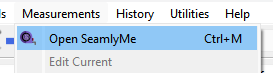
There is no “tape” program in Seamly… it was the old name before we became Seamly. The Measurement editor is now called SeamlyMe, and it’s included in the download. It’s accessible on it’s own from the desktop / file explorer or from within Seamly2D: Measurements->Open SeamlyMe
Being Linux illiterate… is that the only option? You mean there is no seperate SeamlyMe app with the appimage? If that’s the case I’m all the more convinced that Seamly2D and SeamlyMe should be combined into 1 application as it would simplfy so much of the code & build process. It would also mean we could run the SeamlyMe part of the code in the debugger… which currently one can’t debug SeamlyMe.
Right. It’s one of the more minor reasons why I prefer to local-build Seamly on my computer. But It sounds like the benefits of combination to the project as a whole would outweigh my slight aversion to the notion. Actually, do away with the falsity of the combination & I can see implementing synergies which would blow my aversions clear out of the water. At the worst, I trust you not to let anyone make a complete hash of it.