I’m a new user and I am a male. Very much used to the whole world of sewing and pattern-making being almost entirely female-centric. It may be that I don’t know the correct terminology, but I cannot find a way to store men’s measurements in Seamly. I don’t have a bust or any of the myriad permutations of one. But I do have a chest. There doesn’t seem to be a way of adding a chest measurement and having it reflected in the diagrams that the program creates. I confess I’ve only spent two hours searching today, so I may be trying to cut corners. But I can’t really take a day off work to keep going. Any thoughts? Even the men’s & tailoring section doesn’t have a full suite of men-type bits!
The “known” measurement names are just variable names… they are there to basically provide a common naming system. You can call the “chest” measurement what ever you want.
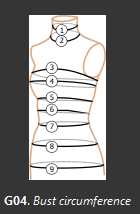
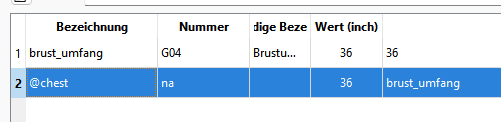
Basically just use the G04 bust_circ as the the chest measurement:
If you don’t like the known names just create all your measurements as custom. The one downside to this is known measurements are translated, custom measurements are not. Well that, and you have to use the “@” symbol with each custom name.
Agreed. As a male I realise we are an afterthought in the sewing community, but I would love to see the inclusion of terms for male measurements. IMO an increase in inclusivity is a benefit for us all.
Functionally, the ‘chest’ measurement in men is the same as the ‘full bust’
measurement in women: the widest part of the chest, running right under the armpits and across the nipple line.
That said… Anything we add for ‘chest’ is simply going to be a duplication of ‘bust’ as far as the diagrams go. Can we add the additional ‘chest’ vaiables - yes. Is it a priority at this time - no.
Personally, I prefer favoring archaic conventions:
Though, yes, it would be nifty to have the option of seeing either male or female measurement diagrams, & I’m sure the development team would be willing to pull your improvement when you make it.
But since Seamly isn’t intended as a framework for learning to draft sewing patterns, I agree with Douglas that it’s a low priority. Though, personally, I might try my hand at altering the graphics in all the free time that I don’t have.
And that would be something completetly different to have 2 sets of diagrams and measurement variables. That is a major rewrite .
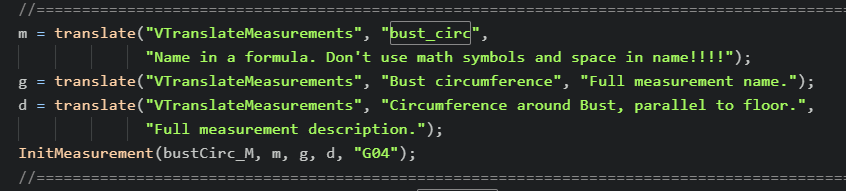
Well it’s more than just the graphics. To start it requires updating the smis & smms schemas. Then we have to decide “what” new numbers are the new ‘chest’ variables. For sake of argument lets say we just update the ‘bust’ measurement diagrams showing 2 numbers. Then new entries have to be made in vtranslatemeasurements.cpp - such as:
Somewhere, I got the impression that they were wishing that at least the picture made it obvious that the measurements can apply to those of a masculine build as well. I’m not seeing it now. Probably I was projecting some of my own confusions when I was just starting.
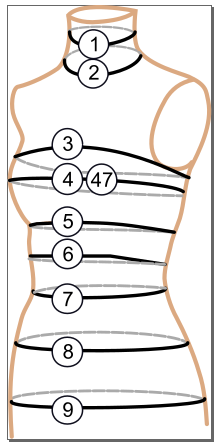
I take “inclusion of terms for male measurements” to mean adding measurements like chest_circ, chest_arc_f, chest_arc_back… etc. Where there would be for ex: an added G47 number for chest_circ, and in the diagram the bust / chest measurement would show G04 & G47… like:
Like I said ‘Bust’ and ‘Chest’ are essentially the same messurement. In 40+ years running a costume shop I never get confused because one theatre’s measurement sheet uses ‘Chest’ even for female actors while another uses ‘Bust’ even for male actors. For all I care you can call it the “Tweedle” measurement… what matters is WHERE was the measurement taken. Thus the diagrams.
Just to add, it would be very unproductive if we would have different names for the same measurements for man/woman. Unisex patterns would be suddenly very hard to do.
Why? You just use one or the other. Again… ME measurements are just internal variable names and you can call them anything you want . That said.- note the use of Chest / Bust below:
So let me ask… if you had to make up the measurement names using only Custom measurements for a unisex pattern - what would you call the Chest / Bust measurement? ‘Chest’ or ‘Bust’… right?
Here’s another can of worms to open if we chose to add “chest” measurements… do we duplcate ALL measurements that refer to ‘bust’… (disregrading ‘highbust’ and ‘lowbust’)
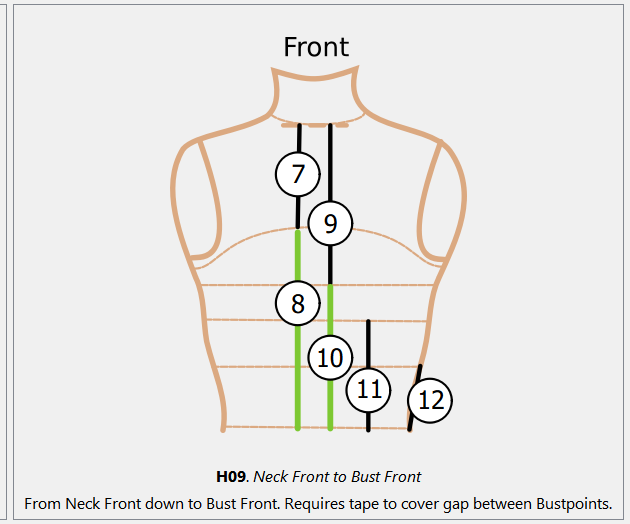
like ‘neck_front_to_bust_f’ and ‘bust_to_waist_f’ :
As I think about this more… are you saying it makes no sense to have “separate” male and female set of measurements as you would then have to have a 3rd “unisex” set?
no, I didn’t thought about that, that would be even more complicated
A lot of my patterns are unisex, for example “working jacket”. In such a pattern I use of course “bust_circ” because it is in measurements sets of both my female and male clients.
If there were separate “bust_circ” and “chest_circ” my formulas wouldn’t work directly. Of course I could find some solutions, but it would be just more work.
The issue here seems to be that some users are confused by the fact there is no measurement specifically called ‘chest’. It’s the same thing as ‘bust’.
We could refactor the whole measurement system to use alias names so one could use “bust_circ” and “chest_circ” thst refer to a single underlyng variable, but the easiest thing - and what I would do - is to simply add the handful of ‘chest’ named measurements that duplicate the ‘bust’ measurements in the diagram.
Which given my 40+ years of costume experience there is a legit use for having both… building costumes and undergarments for drag queens where you might need to know the ‘chest’ size to build a padded bra, and ‘bust’ size to build the costume that goes over the padded bra. The musical Hairspray comes to mind.