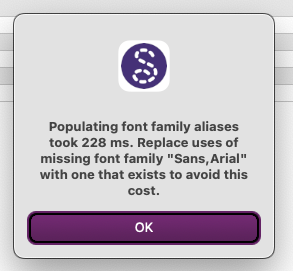
I’m a newbie who has just started using Seamly2D on a Mac, and I get a strange, font-related message when I open Seamly2D - see attached image. I’m running Sequoia 15.7.7 on an Intel Mac. What is causing this and do I need to fix it?
Thanks.
Quin
Hi @Quinn,
It’s a harmless message. It has to do with the different way the MacOs and Qt map the font families… and the 228ms is the time it’s taking Seamly to scan and remap / replace the font with what the MacOs expects.
I will most likely replace the font used here in the PrintPages() routine:
painter.setFont( QFont( "Arial", 8, QFont::Normal ) );
Or specify the font family to use… like:
QFont arialFont("Arial", 8, QFont::Normal);
arialFont.setStyleHint(QFont::SansSerif); // Tells Qt exactly how to categorize it natively
painter.setFont(arialFont);
Thanks for the quick response, Douglas. Very much appreciated  . I’ve got absolutely no idea how to do the fix you’ve listed
  . However, if the message is harmless, I’ll just leave things as they are. Thanks again.
Don’t worry about the fix… I just tend to post ideas for fixes like that for others interested or just to remind myself. 
At any rate I’ve already made a fix. Bascally I fixed the code so it uses the app’s default font… which will use the OS native default font like the rest of the app. I will push the changes to Github so it will build the Mac version which I can the download to test. Which will probably be wed morning sometime. 
Phew! I was a bit worried there as I’m not a coder!! Just a hapless sewer who has been trying for years to get better at pattern drafting.
The fix for the font warning has been merged. Should be in next week’s release or available as an artifact download in the actions section on Github.