So, I’ve been working a bit more in Seamly, and there’s two things that don’t behave the way I’m used to from other design software:
I can’t create a new group for objects from the “Add objects to group” tool. It often happens that I forget to create a group first, select a whole bunch of objects with this tool and then realise I needed to create a group first. Most graphics software allow you to create a group after selecting the objects you want to add to said group.
It would be much more intuitive if I could select objects with the regular tool pointer, right click one of them and add them to a group that way. Even better: if I could either add them to an existing group or create a new group with them.
In fact, now that I consider it, point 2 would probably remove the need for the “Add objects to group” tool in the first place. There’s probably a very good reason why it exists the way it does, but I still figured I’d at least create a suggestion for this.
There’s a reason for this… the initial plan for the groups was to have semantic presets where you just load a collection of groups with names & the pen style already set. WhenI say “semantic” it means that one can load a standard preset of groups so when patterns are shared everyone is on the same page. When a user makes up their own groups it makes it more difficutl to share. Try debugging another users patterm when all their groups are in Spanish and you can’t read them. The groups got put on hold for the issue I’ve previously discussed.
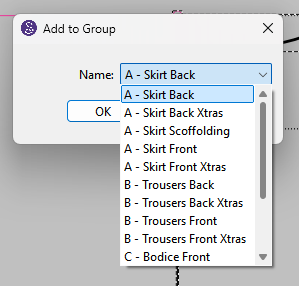
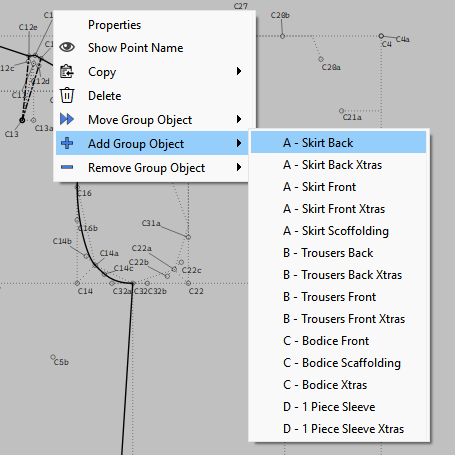
You already can… select and object and use the context menu to select which group to add it to.
That said the more efficent way to add objects to groups willbke when I implement groupd assignment in the tool dialogs. Which BTW I have a solution multtiple groups and color selection.
Ah, yes, I was unclear: this way you only add the object you actually right-clicked to the group. Not all of the selected objects.
Being able to add all of the selected objects would add quite some convenience, I’d say.
Ahh… So you mean that being able to name a group manually in the first place is a temporary workaround until until the preset system could be finished properly?
Right… andi n a previous topic I said currently you can’t add multiple objects to a group. If you care to take a few years to learn how the app code is structured I could exxplain why.
In a sense … yes. I got half way though updating the groups from my original fork and ran into the issue of users using what I call a loophole in allowing objects to exist in more tham 1 group. The update included presets for the groups… where you just load a preset of group names & pen styles. No need to create groups on the fly as you go. Since replying to your other topic I have since come up with a solution to the Schrodinger’s Groups.
Ah, of course! No, I definitely don’t have the insight to appreciate the complexity of the code under the hood I studied a bit of computer science in university, so I know the basics of code, but I never really coded much since then…
What happened is that based on our previous conversation, I hadn’t realised this was actually such a difficult feature to implement. I thought it might just have been an oversight.
I understand now that it’s a difficult thing to implement. I didn’t mean to come across as if I were ignoring what you said previously!
Great to hear you’ve found a path forward for the group presets. I’m looking forward to trying that out at some point
Well… initially I will update the tool dialogs with a custom “drop down table” which will be like a drop down box, but will have 2 checkbox columns… one to check which groups to add an object to, the other will be mutual exclusive for selecting which group will be used for the “By Group” color. That was the sticking point - which group color to use. And to make it fit without making the dialogs bigger than they are.
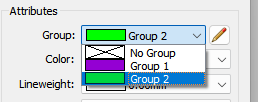
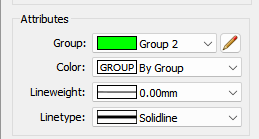
I was able to find a working copy of my old fork… here’s what the tool dialogs were like… where you could assign a tool a group when you created the tool.
What I can probaby do is make the Group combobox “editable” where you can type in a name of a group… if it exists it adds the objects to that group, otherwise it adds a new group with that name - assuming it’s ‘unique’.
Ich war gerade dabei, die Gruppen aus meinem ursprünglichen Fork zu aktualisieren, als ich auf ein Problem stieß: Nutzer machten sich eine Art „Schlupfloch“ zunutze, das es ermöglichte, Objekte in mehr als einer Gruppe zu führen.
Das finde ich auch absolut notwendig, um deine Arbeit übersichtlich zu halten.
Ich habe z.B. unterschiedliche Vorderteilevariationen in unterschiedlichen Gruppen aufgeteilt. Dabei tauchen manchmal auch die gleichen Punkte in den unterschiedlichen Gruppen auf.
Actually no. The groups should have been implemented as a nested structure. No other vector or CAD program groups objects like Seamly. Again I refer to Schrodinger’s cat… it works as a thought experiment, but in the real world objects can exist in only one of two states, dead or alive, Blue or Red, Flipped or Not Flipped, they can’t be both.
That said I have a solution to the group color issue while maintaining the loophole.
I don’t think we will be chamging the groups behavior now… it’s already baked into the cake. Like I said I have an idea for a derived drop down table that will address the objects in multiple groups, but with 1 assigned group color.
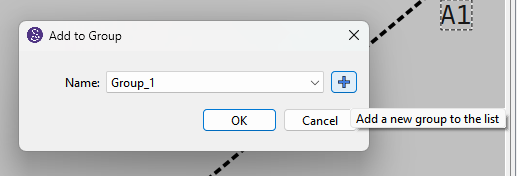
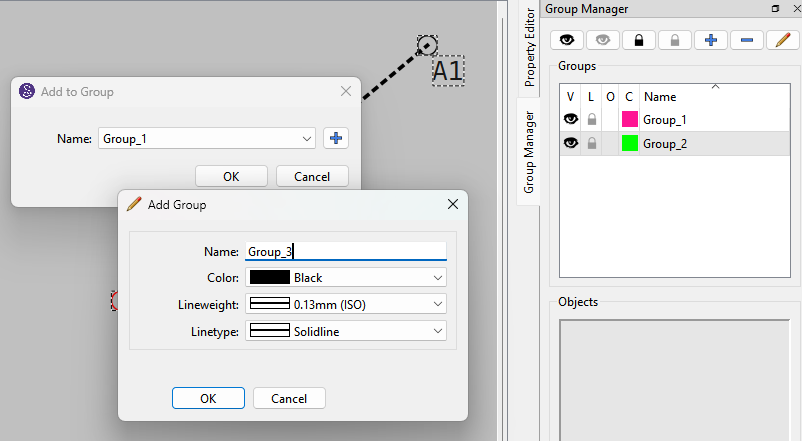
Adding a new group will have an incremental default name. 1st default name is Group_1… followed by Group_2, etc. Of course you are free to change the default name to what ever.
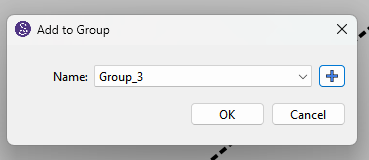
You can now add a new group when you select the Group tool and add a group of selected objects. If you add a new group it becomes the selected item in the Name drop down.
Actually it’s kinda of returning a behavior the way the orginal Groups worked. Where you select the Group tool, select the objects, enter a name and the tool creates a Group of that name and places the objects in that Group. Thimg is the orginal Groups were a PITA as you could not add to or edit a Group.
Adding the default name was mainly because I got tired of having to type in group names every time I test anythng using the groups. I already had code that does this elesewhere - like with pattern piece names - so it was a simple cut & paste.
 I studied a bit of computer science in university, so I know the basics of code, but I never really coded much since then…