It would be ‘nice’ if pop-ups could appear at a User specified offset from the last mouse click. This would save some considerable effort in getting the mouse pointer to the dialogue box, in my case up to 75 centimetres. As always, however one sets the desired positioning in settings, its always ‘wrong’ or inconvenient.
3 „Gefällt mir“
Agreed! The popup position is an annoyance.
1 „Gefällt mir“
It was your idea to have the dialogs pop up in the upper left corner so as to not hide the tool being worked on. 
1 „Gefällt mir“
I assume you mean dialogs… ?
What happens if you are using the second monitor?.. where the 2nd monitor may have no exact relation to the mouse clicks. For example: my 2nd monitor is much larger than the laptop screen. Also It would be a contradiction to say I want the dialog to open on the 2nd monitor, but I want it open at the mouse click.
Also it becomes a nightmare to figure out if a dialog will open fully displayed in the screen, based on the mouse click position and the dialog being positioned relative to the upper left hand corner. It’s just adding a lot of code to figure out where to open a dialog, when most of the time the dialogs are going to have to open where they already do.
I can already tell you what will l happen if we switched to opening the dialogs at the mouse position… users will want the dialogs to open somewhere else - Oh.. like the upper lefthand corner to get out of the way of the object on workspace. It can be MORE annoying to have to move a dialog out of the way than to move the mouse to edit the dialog.
That being said…
" The better UI design depends on the context of the action, not one being universally superior.Open at mouse position is best for context-sensitive, quick actions (menus, popovers) to minimize pointer movement. Preset position (center screen) is best for critical modals that block workflow, as it ensures visibility and focus"
Change your mouse settings… speed the mouse up so you don’t have to physically move the mouse as far to move it on the screen.
BTW… I should note that this all a moot point on a touchscreen. 
For which I just learned something new on my laptop which has a touchscreen… If you touch on an object and hold for a second a square box appears, and when you untouch - it opens the context menu.
3 „Gefällt mir“
I have my dialogs set to Center, that way they will be reasonably close to wherever I need them, & then move them to wherever serves me best this time. Which sometimes varies in one dialog session anyway.

1 „Gefällt mir“
And that’s why the Qt default for Dialogs and Message boxes is the center of the screen. You have to jump through code hoops to get them to open elsewhere. Actually they ALWAYS open at the center… you have to code to move them to place them somewhere else… while making sure they stay on the screen. Opening at the mouse is even more problematic. For ex: With this dialog the only viable mouse positions to use would be within the red box. If the mouse is NOT within the box, you would have to calculate and force the position to be IN the redbox.
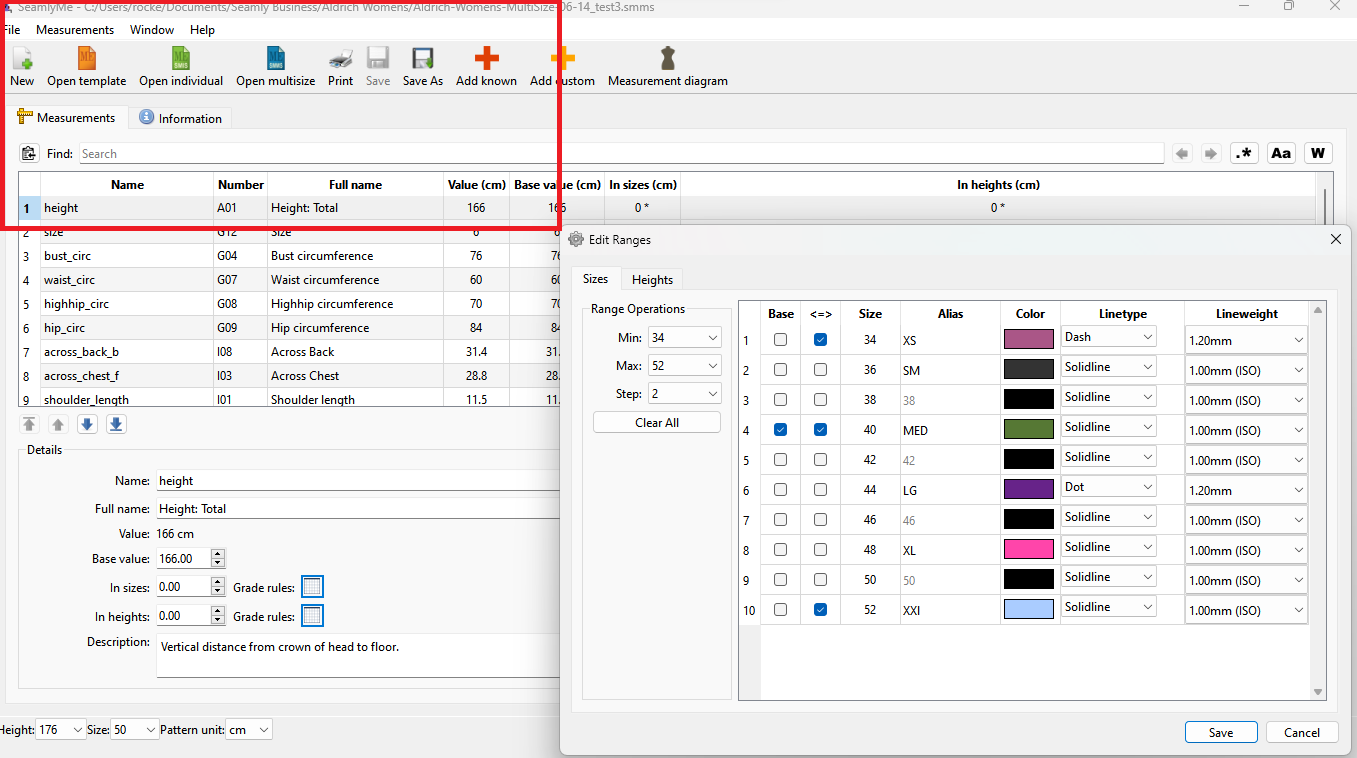
Context menu’s on the other hand open at the mouse as selections are basically done as a single action of the mouse. Click… slide… release
3 „Gefällt mir“
I work in the same way as @Pneumarian . I think that everyone has their own thoughts on where the box should be, so to add lengthy code to suit a handful of people just doesn’t make sense.
I’d rather have the notions added to the Piece Mode and the Multisize Measurements upgraded. 
3 „Gefällt mir“
Hi,
Thanks for the update, I was not surprised to hear that ‘Qt’ makes this impractical.
I have done this in the past with other tools and this was really quite easy in (now) older MS-Visual (C++/Basic) environments. Of course I don’t want Douglas and others to be pandering to the (selfish) needs of the ‘few’, they have other, more important tasks I’m sure.
2 „Gefällt mir“
Really has nothing to do with Qt… dialogs, regardless of OS or framework generally default to open centered on the parent window if provided othewise the system will center it on the screen - which ever one that may be with multiple montors.
That said there’s is no “postion” arguments to a QDialog… it will construct a dialog centered… you can move the (as of yet hidden) dialog window… then show() it. The complexity in opening a dialog at the mouse position is having to calculate all the possible senarios to constrain the dialog to the parent window or screen, as Qt does not provide the functionality to do so like it would a context menu or drop down box. As I’ve pointed out… positioning a dialog to the mouse is generally not a thing. It’s a muscle memory thing. And chances are… as I pointed out in the screencap above… the dialog is not going to open at the mouse postion anyways once constrained.
Implementing moving the dialog to the fixed 4 corners was relatively simple… move it to:
- TL: 0,0
- TR: ScreenWidth - DialogWidth, 0
- BL: 0, ScreenHeight - DialogHeight
- BR: ScreenWidth - DialogWidth, ScreenHeight - DialogHeight
There’s also the question of “what is the last clicked mouse position”? Some dialogs may open with a menu or keyboard shortcut or are simply opened when a new tool is created, and there is no last Mouse Clicked “event” to get a mouse position for. Where do you open the dialog then? Ummm… I would guess the center? 
3 „Gefällt mir“