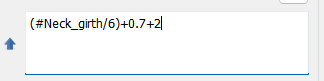
No problem. It can get difficult to see the various variables in a formula as they get bigger and without the spaces to seperate each variable. That’s what I had to do to figure it out.
Yeah… the math parser used is made for parsing c++ style expressions so it doesn’t care about whitespace. I’m just so use to using whitespace now in code where appropriate to help the readability - espceicaly since these eyes are growing old.
I think some people leave out whitespaces around operators to make the formula shorter, so it fits on one line. And sometimes the formula is halfway hidden because the field is not tall enough for the font.
Is there any way to set the formula field height to be 2 lines?
BTW… the expansion arrow was an RT thing… not mine.
Or Just clicking in a lineedit of the Property editor will auto expand when the widget gets focus. Eventually I want to make all the tool dialog lineedits auto expand as well.
Yes. Check out how the Text Edits work in the Property Editor. Instead of all the dynamic code RT put in every tool dialog to expand / shrink the TextEdit boxes, I subclassed the QPlainTextEdit box to expand with focus in, and shrink on focus out. The functionality then resides in the ExpandingTextEdit widget, not dynamic code in every dialog. Basically a few lines VS hundreds.
I just haven’t updated all the tool dialogs to use promoted ExpandingTextEdit’s yet. BTW… I haven’t tried it yet, but I think I could add setting the width wider, so mutiple rows might end up being a moot point.
This will just be a question if expanding the width could make the textedit box go past the frame of the dialog box - without needing the dialog itself to expand.
I’ll check my patterns to confirm that the tool dialogs are ok, that there are no problems displaying a single line formula. Sometimes in the recent past the formula field was not tall enough for a single line formula, such that I could only see the top half of the characters. In these situations I had to click the blue arrow to read the length or angle formula. I’ll check to make sure this isn’t happening anymore.