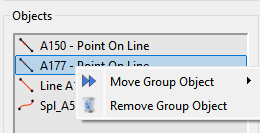
Is there a method / tool / trick to remove objects from a grouping … perhaps similar to Inkscape’s CNTL+Shift+G ??
I inadvertently added a (very) large number of objects to a group - the punishment for my rash actions seems to be the removal of all objects ‘one-at-a-time’  …
…
2 Likes
If you just used the Group tool to add a group of objects:

You can just Undo the operation.

If you added a bunch of objects sequential one by one… you could just keep Undo’'ing each one.
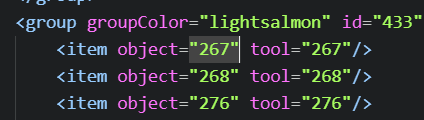
Otherwise… if you want to remove a list of objects / tools from a group… currently there is no way to do so other than manually editing the XML to remove the unwanted group <item>'s.
That said I could look into making the Objects list mutli selection and adjust the remove routine to handle all the selected objects.
2 Likes
Thanks … I remarked much too late to do the ‘Undo’ (CNTL+Z) But the idea of editing the XML directly didn’t occur to me! … Great Idea. Thanks again
1 Like
Just keep in mind you have to back track and identify which object / tool is which. The groups only have <item>'s with the object & tool IDs.
BTW… because the groups illustrate this perfectly. Every object has a tool it belongs to. For most objects the object id and tool id are one in the same.
For ex: Object 267 above is an Endline point tool:
<point angle="90" basePoint="50" id="267" length="(SplPath_A11_A32+SplPath_A32_A30)/3-0.5" lineColor="black" lineType="dotLine" mx="1.25175" my="-0.586207" name="m2" showPointName="true" type="endLine"/>
so the Object id and Tool id are the same.
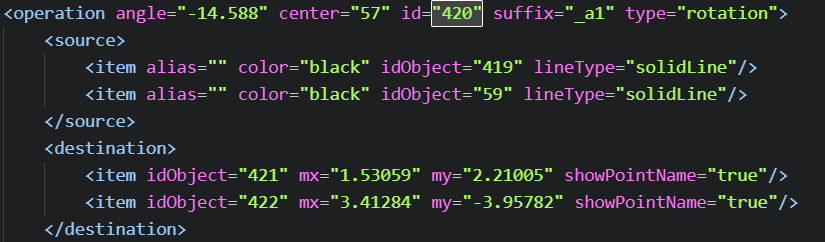
Where the object id and tool id will differ is with Operations tools like Rotation.. for ex:
Here objects 421 and 422 belong to tool id 420… and if we look at the group we get:

And if you back track further - object 421 is a rotated copy of object 419 and object 422 is a rotated copy of object 59. Of course to know what 419 & 59 are you would have to back track even further.
Which can you also use the History to identify what Id is which name:

So with the History I can determine that 421 is probably point A45_a1 and 422 is point A27_a1.
1 Like