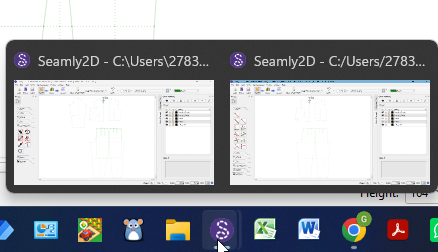
In programmes like Office you have “Window” where you can easier move between the files you have open. I’ve searched for a way to move between the files I currently have open in Seamly2D and can’t find it.
Is there a way to do this? And if not, can you make one please?
Not as part of Seamly, but I get by fine with system/environment level switching.
On Devuan Linux, using the Xcfe desktop environment, having one workspace dedicated to Seamly, I just Alt-Tab between windows.
I’m pretty sure that when I was using Ubuntu Alt-Tabbing would jump between workspaces/“screens” too, so that wasn’t as handy. I think there was a key to limit to the current program, but I didn’t use multiple windows enough to bother remembering.
Normally, if you have multiple files open in Seamly & you hover over the icon in the task bar, it will show you which ones you have open and you can select the one you want from there.
And the Alt/Tab key will also scroll through each file and program that you have open, as well.
In an ideal world Seamly would have been built with tabbed windows from the beginning. Unfortunaelty that is not the case, and it would not be an easy task to make it so now.
I know that applies to Windows. @heathermary is using Linux. Not being a Linux user I defer to @Pneumarian.
I am quite happy that Seamly doesn’t have nested (tabbed) windows, as most of the software I am using (office and CAD) doesn’t have it. I am just used to move between different programs with one combination (Alt+tab). Otherwise I need to be mindful when to use Alt+tab and when Ctrl+tab.
To be honest… I mainly only have more than 1 Seamly pattern windows open when I’m debugging or testing the app, where I’m running 2 different versions of the app… not 2 different patterns. Seamly is not an app you can cut & paste from one patterm to another so I don’t see much value in having more than 1 pattern open at a time open.