I present my first valid attempt at a MultiSize pattern. It has rounded corners which I found much simpler than joining the curves of saddle points on perpendicular surfaces used in the bag for resting air rifles in competition shooting.
TL;DR It worked. Please make suggestions to improve how I do this in future projects.
The product is still another bag, not an item of clothing. It is a zippered bag that can open flat for storing skydiving canopies. It has carry handles and an ID Window on the exterior. The interior will have snap attachments and webbing with velcro to curtail movement of the canopy risers. Admittedly, I could have sewn such a bag with no pattern in less time than I spent scouring the forums to correct the errors I produced while muddling through the learning process.
I started this by following suggestions offered in my original thread. First, was creating a .vst file instead of all of the measurements being placed into a Variables Table.
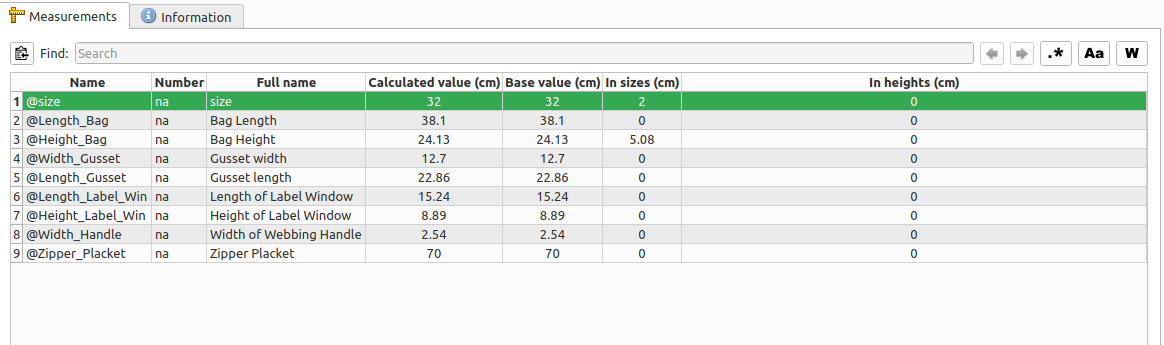
Items 5 and 7 were put in as placeholders and do not match the calculated values I settled on. Item 1 was added later in the process. The above measurements are for the smallest of the three bags to be sewn. Only one of the three dimensions, H - W - L, incremented linearly through all three sizes and is the only one shown to do so in the measurements. I began with the intention of designating the three sizes as pattern sizes 30, 40, and 50. I ended up using 30, 32, and 34 for S, M, and L. Thanks @Douglas
At this time I made the outline of the largest Draft Piece. The other two dimensions were not linear, so incrementation for them was placed in the variables table. Since .vst files are metric, I was thinking I would add a variable for converting cm to in. My first attempt to do so didn’t work so (maybe because Item 1 @size was not yet in my measurements), since I am not uncomfortable using metric I did.

The formulae shown came after the hours of scouring and muddling I alluded to.
First I tried size>32?11.43:size>30?6.35:0 with out success. Then I may have tried something like (size>32?11.43:@size>30?6.35:0) , then size==34?11.43:size==32?6.5:0 , sometime I finally came across (@size>32?11.43:@size>30?6.35:0) . Somewhere in here I added Item 1 to the Measurement file and started getting my outline in Draft to change sizes. Actually, @Height_Bag had been changing all along, correctly I believe. But, @Length_Bag was not behaving, not all of the resulting lengths were correlating to the proper pattern size. I would get two of M and one at L length, then I would get two at L and one at M, then two at S and one at M, and so on. I was changing the nesting of factors with in the the formula, I was changing the In Sizes number from 0 to 1 to 2. I was trying many permutations of changes to formula structure, In Size of @size, etc. I finally noticed that @size had 32 as the base pattern and changed that to 30. I finally got 3 correct Length sizes, made a few more alterations to the formula (resetting it to things I had already tried) and got the correct Length to pair to the corresponding Pattern Size. 
Key Points:
- @size or @Size in Measurement File
- the formula must have the correct format, I absolutely needed the @size instead of size
- all of the formula that at least partially worked had the beginning and ending parenthesis
I have yet to print the pattern. When I do I will not be printing the zipper placket and gusset pieces. I created them to be certain of the correct size. I have no problem cutting rectangular pieces of fabric.
So, this pattern seems to work. But I don’t know in what ways it could be approved. Any and all polite suggestions would be appreciated. (Well any suggestions, I’m not thin skinned.)
Canopy-bag-multi-pattern.sm2d (22.6 KB)
canopy_bag_measurements.smms (2.1 KB)