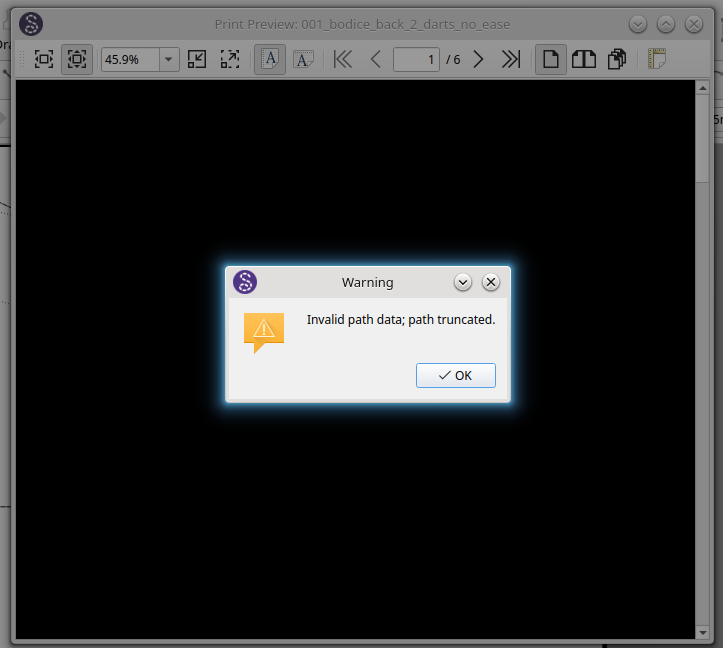
In layout mode, File > Preview > Preview tiled PDF The error message that comes up is: Invalid path data; path truncated
We need to know more… like what is the build verrsion and if you can provide the pattern & measurements that caused the error.
Version 2026.9.21.146
Qt version 6.11.1
Build revision Git: 1c9088a7a734
Compiler: GCC 11.4.0 64bit
The error occurs with when I go to print preview all patterns.
I wonder if it’s a localization issue? I’m not getting this with either my local-build, or the AppImage. I assume it’s probably not that I’m using Devuan & @heathermary uses Ubuntu.

I checked the 2026.9.21.146 Windows build no issues. I downloaded the appimage build and when I get a chance I’ll check it out.
Well… I checked last week’s release on Kubuntu and I can’t test the Preview as I don’t have any printer installed. 
That said… can I get a clarification on the error message… did it actually say
“qt.svg: Invalid path data; path truncated”
From my research if this is the case it appears some Linux distros have issues with rendering some SVG’s. Until I can look into it more I suggest trying to change the Theme and see if that fixes the issue.
I found I can print by going to File > Export Layout As … and choosing File format PDF tiled files.
Yes. Good point. But you then are missing the ability preview I assume?
The questions are:
-
Is the
PrintDialogshowing up and working properly despite the warning, or is the dialog failing to open entirely -
Did you try changing the Theme?
Assuming this is the issue:
The Root Cause: That specific Linux build is running a desktop icon theme where the printer/document SVG files contain implicit cubic Bézier curve paths (C command continuations) or Inkscape metadata
While this path data is perfectly valid under standard web specs, Qt’s Linux SVG parsing engine is incredibly strict. When it encounters these specific paths in the system theme icons, it throws the qt.svg: Invalid path data; path truncated warning into your console
Since the Print Dialog is system dialog it should not really be a Seamly issue, as it’s not using any Seamly icons.
Once the file is exported into PDF format, I can preview it from there.
-
No, the PrintDialog does not show up at all, just the black window error message, which shows up twice. i.e. I click OK. It shows up again. I click OK and Seamly closes down.
-
No I haven’t changed the Theme. As I can print preview and print, I’m happy to leave it at that.
Fair enough. I’ll keep at it and see if I can reproduce the error here, and a solution if posslble.
It’s probably(?) not related, since it looks normal today, but yesterday when I was looking into it the print icon in the tiled preview did look a bit odd, almost like it was blank, but with a thick black outline. However, it kinda did look like an old laser printer. I did not think to check the non-tiled preview.
Again the QPrintDialog is system gemerated… so it doesn’t use any Seamly icons. Meaning we can’t fix any offending svg’s. It’s why the one suggestion I found was to switch Themes. In either Print preview or Tiled PDF preview the same icons are used.
I would assume we might need to know what distro and theme @heathermary is using that could be causing the issue.
I also need to look at whether it’s just a noisy exception / warning that we can have Seamly2D ignore.
Distro and theme as below:
Description: Ubuntu 24.04.5 LTS Release: 24.04 Codename: noble
Theme: Kubuntu
Kubuntu is a not a theme… it’s an Ubuntu distro based on KDE Plasma rather than Gnome. The default theme for Kubuntu is Breeze. The theme changes the palette and icons… and it appears it’s an svg icon that is causing the Print Dialog issue.
Upgraded to VERSION=“26.04.1 LTS (Resolute Raccoon)” Theme: Breeze
Is the error still there?
Yes. I’ve tried another theme. Still the same.
It gets worse! On starting Seamly2D today, after upgrading my Linux version yesterday, the programme is producing multiple error messages. And continues to crash after each one.
I decided to re-install the programme from your website. Version 2026.9.28.151 - I followed the instructions: ./Seamly2D-x86_64.AppImage and ./Seamly2D-x86_64.AppImage
Here are some of the outputs from the command line as I tried using the programme.
qt.qpa.plugin: Could not find the Qt platform plugin “wayland” in “” WARNING:Can’t begin to listen for incoming connections on name ‘SeamlyMe’ QWidget::repaint: Recursive repaint detected
Invalid path data; path truncated. QBackingStore::endPaint() called with active painter; did you forget to destroy it or call QPainter::end() on it? WARNING:Couldn’t load ssl library WARNING:Couldn’t resolve ssl symbols
On a happier note, I still have all the old versions from previous updates. I last used Seamly in July and Version 2026.7.6.215 is working fine!
Just to clarify… when you say “Linux version” are you referring to Linux itself or a Seamly Version?
I keep a copy of every I install or build. BTW… you can always go to Github and download any release.